
Running a cleaning business gets complicated surprisingly quickly.
At first, a calendar, spreadsheet, phone, and basic invoicing tool may be enough. But once you start managing recurring clients, multiple jobs, quotes, invoices, payments, and cleaners, information can become scattered across several different systems.
Jobber is designed to bring many of those tasks into one platform.
But that does not automatically mean every cleaning business needs it.
In this Jobber review, we’ll look specifically at how Jobber fits a cleaning business, what it can help you manage, how much it costs, where its limitations are, and what type of cleaning company is most likely to benefit from using it.
Quick Verdict: Is Jobber Worth It?
Best for: Growing cleaning businesses managing recurring clients, multiple cleaners, and frequent quotes or invoices.
Less suitable for: Solo cleaners with a small client base and simple scheduling needs.
Biggest advantage: Jobber connects scheduling, customer management, quoting, invoicing, and payments in one workflow.
Main drawback: More advanced automation and team management features require higher-priced plans.
Our verdict: Jobber is worth considering when managing your cleaning business across separate tools is becoming time-consuming. If your current system is simple and working well, you may not need it yet.
What Is Jobber?
Jobber is field service management software built for home and service businesses.
Instead of using separate tools for scheduling, customer records, estimates, invoices, payments, and team coordination, Jobber brings these workflows together.
For a cleaning business, that can include:
- Managing customer information
- Scheduling one-time and recurring cleaning jobs
- Creating and sending quotes
- Creating invoices
- Accepting online payments
- Sending appointment reminders
- Tracking job details
- Managing cleaners and assignments
- Giving customers access to a client portal
- Automating parts of the customer workflow
Jobber is not accounting software or a cleaning-specific checklist app.
It is better thought of as the operational system connecting the customer journey from the initial request through scheduling, service, invoicing, and payment.
How Jobber Works for a Cleaning Business
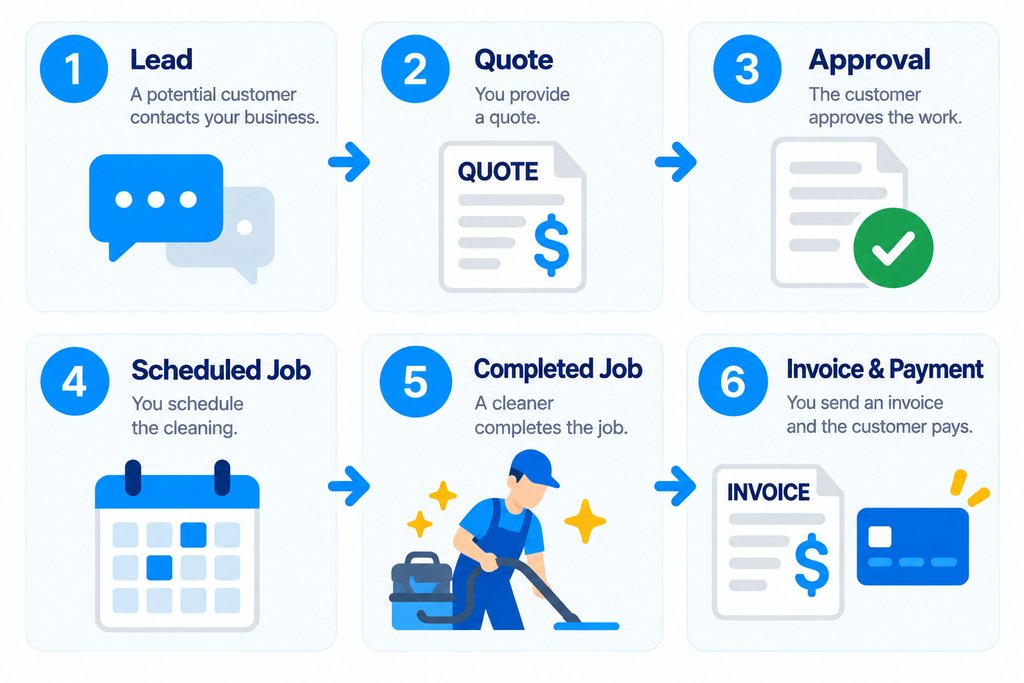
A typical cleaning job can involve several steps.
- A potential customer contacts your business.
- You collect their information.
- You provide a quote.
- They approve the work.
- You schedule the cleaning.
- A cleaner completes the job.
- You send an invoice.
- The customer pays.
Then, if they become a recurring customer, the process starts again on a schedule.
Without a central system, those steps can easily become spread across email, text messages, calendars, spreadsheets, and payment apps.
The diagram below shows how Jobber can connect these steps into a more streamlined workflow.
For example:
That becomes more valuable as the number of customers and jobs increases.
Recurring Cleaning Jobs Are Where Jobber Starts to Make More Sense
Recurring service is particularly important for many residential and commercial cleaning businesses.
A customer might book:
- Weekly cleaning
- Biweekly cleaning
- Monthly cleaning
- Recurring office cleaning
Managing a few recurring customers manually is not difficult.
Managing dozens of recurring customers while handling cancellations, rescheduling, employee availability, customer notes, and new leads is a different problem.
This is where dedicated field service software can begin saving meaningful administrative time.
Jobber Features That Matter Most for Cleaning Businesses
Jobber includes a large number of features, but cleaning businesses will not necessarily use all of them.
The following are the ones most directly connected to day-to-day cleaning operations.
Scheduling and Dispatching
Jobber provides a centralized calendar for scheduling jobs and assigning work.
Instead of keeping customer appointments in one calendar and employee schedules somewhere else, jobs can be connected directly to customer records and assigned to team members.
For a growing cleaning company, this can help answer basic operational questions quickly:
- Who is cleaning this property?
- When is the job scheduled?
- Is it recurring?
- What instructions does the cleaner need?
- What jobs are happening today?
Scheduling becomes increasingly important as you add customers and cleaners.
We compare Jobber with other scheduling options here:
Best Scheduling Software for Cleaning Businesses: 7 Tools Compared (2026)
Client Management
Jobber includes customer relationship management functionality for storing client information and job history.
That gives you a central place for details such as:
- Customer contact information
- Property information
- Previous jobs
- Quotes
- Invoices
- Notes
- Upcoming work
For a cleaning company, this reduces the need to search through old emails or text messages every time a customer contacts you.
Quotes
You can create and send professional quotes through Jobber.
This is useful when pricing varies based on factors such as:
- Property size
- Cleaning frequency
- Deep cleaning requirements
- Add-on services
- Property condition
- Commercial scope
More advanced quote features are available on higher plans, including options designed to present add-ons and more customized quotes.
If you are still developing your quoting process, start here:
Cleaning Business Estimate Template: How to Create Professional Quotes That Win Jobs
Invoicing and Payments
Jobber can create invoices and accept online payments.
That means the workflow does not have to end when the cleaning is completed.
The job information can continue into billing and payment collection.
This can be particularly useful when you are managing many recurring customers and do not want invoicing to become a separate manual process.
For the fundamentals of what a professional cleaning invoice should contain, see:
Cleaning Business Invoice Template: Free Professional Template & Examples
Client Hub
Jobber’s client hub gives customers an online place to interact with your business.
Depending on the workflow, customers can use it to review information such as quotes, appointments, and invoices and to make payments.
For a cleaning company trying to appear more organized and professional, this can improve the customer experience without requiring you to build your own customer portal.
Mobile App
Cleaning businesses do not operate entirely from a desk.
Owners and cleaners are often moving between properties throughout the day.
Jobber provides mobile apps for iOS and Android so operational information can be accessed while in the field.
That matters more once multiple people need access to current job information.
Should You Try Jobber?
If your cleaning business regularly handles recurring appointments, customer follow-ups, and invoices, testing Jobber with a real workflow can help you decide whether a centralized system would save you time.
Start with one typical customer, one recurring cleaning job, and one invoice. You do not need to move your entire business into the software just to evaluate it.
Jobber Pricing
Jobber offers four main plans. The following are the regular no-commitment monthly prices listed at the time of this review.
| Plan | Monthly Price | Users |
|---|---|---|
| Core | $49/month | 1 |
| Connect | $139/month | 1 |
| Grow | $199/month | 1 |
| Plus | $499/month | 5 |
Annual billing or longer commitments may reduce the effective monthly cost, and promotional offers may change the price. Check Jobber’s official pricing page for current details before choosing a plan.
How to Evaluate the Cost
Do not compare plans by subscription price alone. Identify the features your cleaning business would actually use, check which plan includes them, and estimate whether the time saved or operational improvements justify the monthly cost.
For example, a solo cleaner may prioritize scheduling and invoicing, while a growing team may place more value on automated reminders, employee coordination, and job costing.
What Do the Plans Actually Change?
The cheapest plan is not simply a smaller version of the most expensive one.
Different plans unlock different operational capabilities.
| Plan | Main Capabilities |
|---|---|
| Core | Booking, scheduling, quotes, invoices, payments, and reporting |
| Connect | Adds client reminders, payment collection, job checklists, and follow-ups |
| Grow | Adds advanced quoting, job costing, two-way SMS, and workflow automation |
| Plus | Adds tools for larger teams, onboarding, and premium support |
The key question is not which Jobber plan is cheapest, but which workflows your cleaning business actually needs it to handle.
Which Jobber Plan Makes Sense for a Cleaning Business?
There is no single plan that is right for every cleaning company.
Solo Cleaner or Very Small Business
Suggested plan: Core
Core may be sufficient if you mainly need scheduling, customer records, quotes, invoices, and payments.
However, if you only manage a handful of customers, consider whether you need paid field service software yet.
Growing Cleaning Business
Suggested plan: Connect
Connect is worth considering when recurring appointments, customer reminders, follow-ups, and team coordination begin taking up significant administrative time.
Cleaning Business Focused on Growth and Profitability
Suggested plan: Grow
Grow may be suitable when you need more advanced automation, quoting, and job costing to understand the profitability of individual cleaning jobs.
Before choosing a plan, you can use our Cleaning Business Profit Margin Calculator to evaluate your current margins.
Larger Cleaning Teams
Suggested plan: Plus
Plus may be relevant for businesses managing larger teams, more complex operations, and additional reporting or support requirements.
For smaller cleaning companies, the additional cost may be difficult to justify.
What We Like About Jobber for Cleaning Businesses
It Connects the Entire Job Workflow
The biggest advantage is not any single feature.
It is the connection between them.
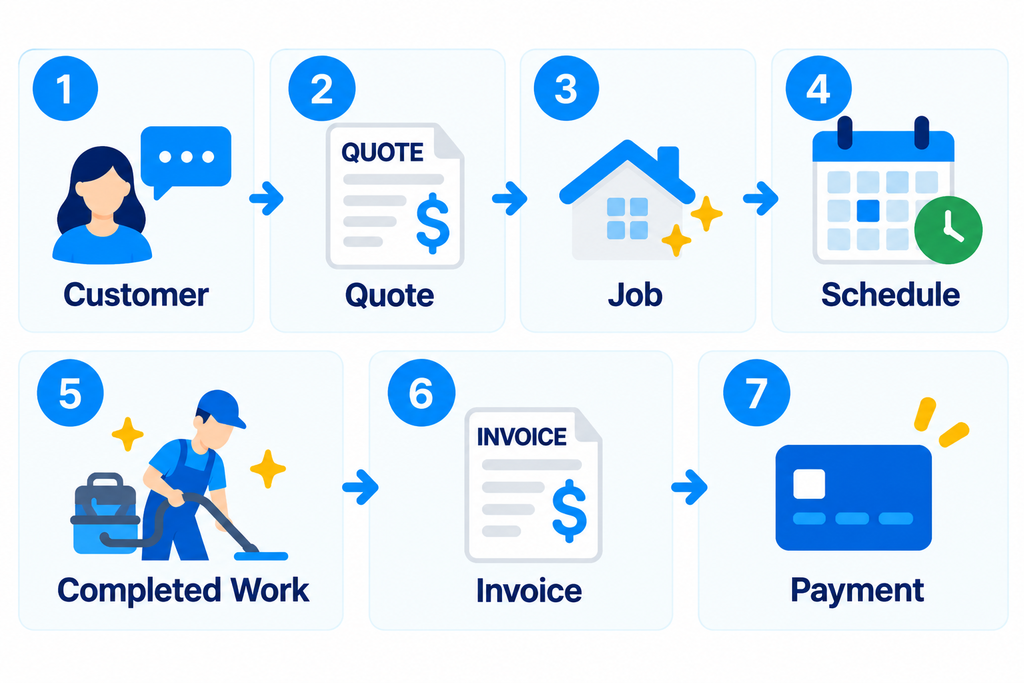
That reduces the amount of information that needs to be copied manually between different systems.
It Fits Recurring Service Businesses
Cleaning is often recurring.
That makes scheduling, reminders, customer history, payment collection, and repeatable processes especially important.
Jobber is designed around ongoing field service operations rather than isolated one-time transactions.
It Can Grow With the Business
A solo cleaning business may only use a small part of the platform.
As the business adds cleaners and customers, additional scheduling, automation, communication, and profitability features can become useful.
That means you may not need to replace your entire operating system simply because the company grows.
It Creates a More Professional Customer Experience
Professional quotes, appointment communication, invoices, online payments, and a customer-facing hub can make a small cleaning company feel more organized.
That does not replace good cleaning.
But the administrative experience is still part of the service customers receive.
Where Jobber May Not Be the Best Fit
Jobber is not automatically the right choice for every cleaning business.
It Can Be More Software Than a New Business Needs
If you have five customers and manage everything yourself, you may not need a full field service platform.
A calendar, basic invoicing tool, and simple customer list may be enough initially.
Software should solve an actual operational problem.
The Cost Increases as Your Needs Grow
The entry plan is relatively accessible, but more advanced automation, profitability, communication, and team functionality requires higher plans.
A feature that looks useful may therefore need to be evaluated against the additional subscription cost.
Some Cleaning Businesses May Prefer More Specialized Tools
Jobber serves many types of home and field service businesses.
That flexibility is useful, but it also means the platform is not designed exclusively around cleaning companies.
Businesses with highly specialized cleaning workflows may prefer a tool built around those specific requirements.
Accounting Still Requires a Separate Accounting System
Jobber can manage operational financial workflows such as quotes, invoices, payments, expenses, and job costing.
But it should not be confused with full accounting software.
As your business grows, proper bookkeeping and accounting still need to be handled appropriately.
Jobber Pros and Cons
Pros
- Combines scheduling, quoting, invoicing, and payments
- Supports recurring cleaning jobs
- Centralizes customer information and job history
- Provides professional quotes and invoices
- Offers online payments and a client-facing portal
- Enables mobile access for owners and field teams
- Offers advanced automation on higher-tier plans
Cons
- May be unnecessary for a very small startup
- Higher-level features require more expensive plans
- Pricing increases as team and feature requirements grow
- Not built exclusively for cleaning companies
- Does not replace full accounting software
Jobber vs. Using Separate Tools
One alternative to Jobber is building your own software stack.
- Google Calendar for scheduling
- Spreadsheets for customer information
- A separate tool for estimates
- A separate tool for invoicing
- A payment processor
- Text messages for customer communication
This can be inexpensive and perfectly workable when the business is small.
The problem is fragmentation.
As volume grows, you may spend more time moving information between systems and checking whether everything is up to date.
Jobber’s value proposition becomes stronger when reducing that fragmentation is worth more than the subscription cost.
This is why software decisions should be based on the stage of your business rather than simply the number of features available.
Is Jobber Worth It for a Cleaning Business?
Jobber is most likely to make sense when your cleaning business has reached the point where scheduling, customer communication, quotes, invoices, recurring work, and team coordination are becoming difficult to manage manually.
It may be a strong fit if you:
- Manage recurring cleaning clients
- Send frequent quotes and invoices
- Want customers to pay online
- Coordinate multiple cleaners
- Spend too much time on administrative work
- Want more automation
- Need better visibility into jobs and customers
It may be less compelling if you:
- Are just starting
- Have very few customers
- Work entirely alone
- Have simple scheduling requirements
- Already have a lightweight system that works well
The right time to adopt software is when the operational benefit begins to justify the cost.
Try the Workflow Before Committing
Jobber currently offers a 14-day free trial, and Jobber says no credit card is required to start the trial.
That makes the trial useful for more than simply clicking through features.
- Add a test customer.
- Create a quote.
- Schedule a recurring job.
- Complete the job.
- Generate an invoice.
- Test the customer experience.
After completing the test, ask yourself: Did Jobber make your workflow easier enough to justify the subscription cost?
A real workflow test is more useful than choosing software based on a feature list alone.
How Jobber Fits Into a Cleaning Business Tech Stack
Jobber can become the operational center of a cleaning business, but it does not need to do everything.
A typical setup might look like:
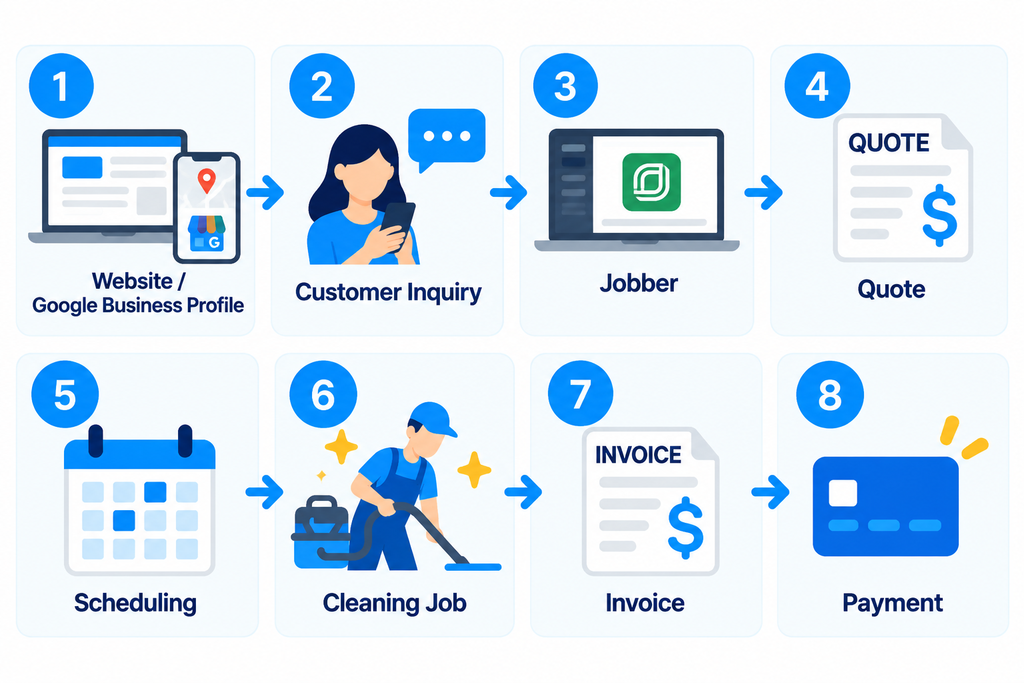
Accounting and other specialized systems can then connect around that core workflow where necessary.
If you want to compare Jobber against other platforms before deciding, start with our broader guide:
Best Cleaning Business Software: 7 Tools Compared
https://getopsbutler.com/best-cleaning-business-software/
Final Take
Jobber can help cleaning businesses manage scheduling, customer information, quotes, invoices, and payments in one system.
For solo cleaners with only a few customers, simpler tools may be sufficient. But as recurring jobs, customer communications, and team coordination become more complex, a centralized system can become more valuable.
Our verdict: Jobber is worth considering if managing your cleaning business across separate tools is becoming time-consuming. The best way to decide is to test it with your actual workflow.
If the software saves you meaningful administrative time and fits your budget, it may be worth the investment. If not, there is no reason to commit to a paid plan.