
Running a cleaning business gets complicated quickly. Scheduling jobs, managing cleaners, communicating with customers, sending invoices, and collecting payments can consume hours every week.
The right software can simplify those tasks—but the best choice depends on your business. A solo residential cleaner has very different needs from a growing maid service or a commercial cleaning company managing multiple locations.
We compared seven popular cleaning business software platforms based on features, pricing, target customer, and long-term cost to help you find the right fit for your business.
Pricing and plan details checked: September 2026
Quick Answer: The Best Cleaning Business Software
If you want the short version, Jobber is our best overall pick for most cleaning businesses. ZenMaid stands out for residential cleaning, while Swept is better suited to commercial and janitorial operations. The right choice depends on whether your biggest need is customer management, scheduling, workforce management, or controlling costs as your team grows.
| Software | Best For | Starting Price | Our Take |
|---|---|---|---|
| Jobber | Best Overall | From $29/mo | Strong all-around choice |
| ZenMaid | Residential | From $19/mo | Built for maid services |
| Housecall Pro | Growing Teams | From $59/mo | Powerful field-service tools |
| Swept | Commercial | From $30/mo | Built for janitorial operations |
| MaidCentral | Established | From $450/mo | Advanced cleaning operations |
| Connecteam | Workforce | Free for up to 10 users* | Excellent workforce tools |
| Maidily | New Cleaning Businesses | From $21/mo | Simple, cleaning-specific option |
Our Overall Pick: Jobber
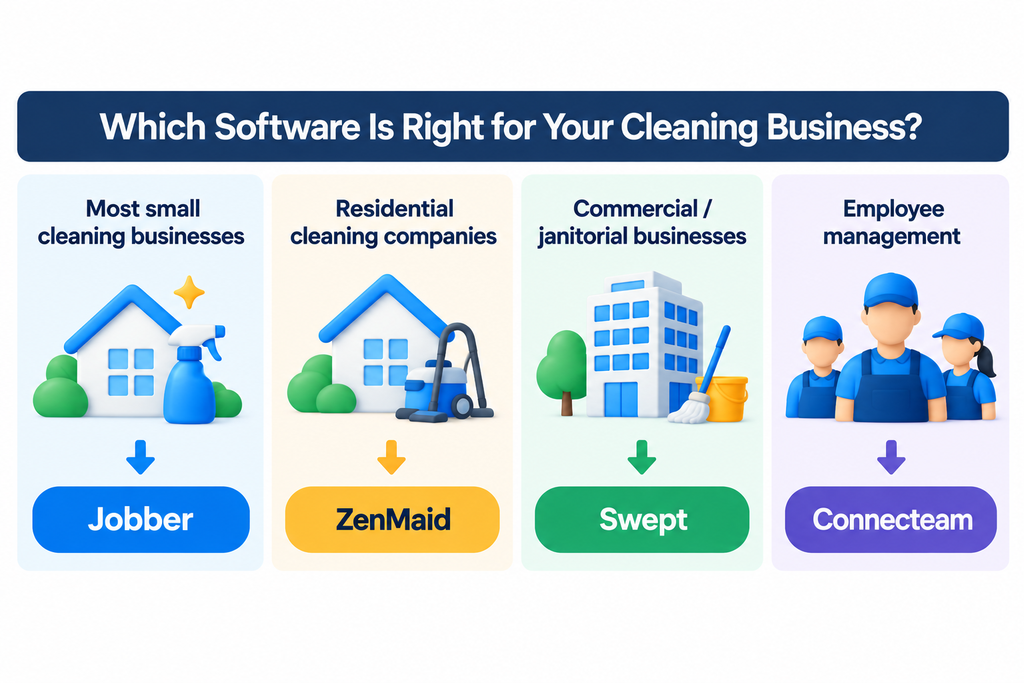
For most small cleaning businesses looking for one platform to manage customers, jobs, quotes, invoices, scheduling, and payments, Jobber is our best overall pick.
That does not mean Jobber is right for everyone. Residential cleaning companies may prefer ZenMaid, commercial janitorial businesses should take a serious look at Swept, and teams primarily focused on employee management may get better value from Connecteam.
The best choice depends on how your cleaning business actually operates.
Each column shows the estimated total software cost over three years for a business using the platform with 1, 5, or 10 users.
What Could These Tools Cost Over 3 Years?
| Software | 1 User | 5 Users | 10 Users |
|---|---|---|---|
| Jobber | $1,044 | $5,364 | $8,244 |
| ZenMaid* | $684 | $1,260 | $1,980 |
| Housecall Pro | $2,124 | $5,364 | $16,164 |
| Swept* | $1,080 | $1,080 | $1,080 |
| MaidCentral* | $16,200+ | $16,200+ | $16,200+ |
| Connecteam* | $0 | $0 | $0 |
| Maidily* | From $756 | From $756 | From $756 |
These figures are not apples-to-apples quotes. Each platform uses a different pricing model, so this comparison is intended to show approximate long-term cost at the selected plan and team size—not identical levels of features or usage.
Pricing notes: ZenMaid figures use the Starter plan, which is limited to 40 appointments per month. Swept figures assume the Launch plan with 1–15 locations. MaidCentral pricing starts at $450/month and varies by locations and completed jobs; a separate onboarding fee also applies. Connecteam figures assume eligibility for its free Small Business Plan for up to 10 users. Maidily pricing starts at $21/month; the 3-year figures use that starting price and assume pricing remains unchanged.
3-year costs assume September 2026 pricing remains unchanged for 36 months. Taxes, payment-processing fees, optional add-ons, and temporary promotions are excluded.
1. Jobber — Best Overall
Best for: Cleaning businesses that want one platform for customer management, scheduling, quoting, invoicing, payments, and day-to-day field operations.
Jobber is a field-service management platform rather than software built exclusively for cleaning companies. That broader focus can actually be an advantage for businesses that want to manage customers, jobs, quotes, invoices, payments, and scheduling in one system.
For a cleaning company that wants to reduce the number of separate tools it uses, Jobber offers one of the strongest all-around feature sets in this comparison.
Jobber Pros & Cons
Pros
- Strong all-around feature set for cleaning businesses
- Handles scheduling, quotes, invoices, and payments in one platform
- Scales from solo operators to growing teams
Cons
- Costs can rise significantly as your team grows
- Some useful automation and reporting features require higher-tier plans
- Not built exclusively for cleaning businesses
Why We Like Jobber
Jobber’s biggest strength is balance. It combines customer management with the operational tools a cleaning business needs to move work from booking to payment.
Core features include online booking, quotes, invoicing, online payments, scheduling, and customer management. Higher plans add features such as automated reminders, quote and invoice follow-ups, QuickBooks Online sync, job forms and checklists, and more advanced reporting.
For many small cleaning companies, that means fewer separate apps and less administrative work.
Jobber Pricing
Jobber’s cost depends on both the plan and team size. Based on annual billing checked in September 2026, Core starts at $29 per month for one user. Connect costs $149 per month for five users and $229 per month for 10 users.
That works out to approximately $1,044 over three years for one user, $5,364 for five users, and $8,244 for 10 users, assuming current pricing remains unchanged.
This is why we recommend looking beyond Jobber’s starting price. It can be reasonably priced for a solo operator, but the cost rises as your team grows.
Who Should Choose Jobber?
Jobber is a strong fit if you want one system to handle both the customer side and the operational side of your cleaning business.
It is especially worth considering if you currently use separate tools for scheduling, quotes, invoices, payments, and customer information and want to consolidate those workflows.
If your business is focused exclusively on residential maid services or commercial janitorial operations, however, a more specialized platform such as ZenMaid or Swept may fit your workflow better.
OpsButler Verdict
Best overall for most small-to-growing cleaning businesses. Jobber offers the strongest balance of customer management, scheduling, financial workflows, and field operations among the tools we compared. Its main drawback is that the price can increase significantly as your team grows.
2. ZenMaid — Best for Residential Cleaning
Best for: Residential cleaning and maid service businesses that want software designed specifically around their day-to-day workflow.
Unlike broader field-service platforms such as Jobber, ZenMaid is built specifically for maid service businesses. Its tools focus on the workflows residential cleaning companies use regularly, including scheduling, automated customer and cleaner communications, invoicing, online payments, and mobile access.
That cleaning-specific focus is ZenMaid’s biggest advantage. Businesses that do not need a broader field-service platform may find its workflow more closely aligned with the way a residential cleaning company actually operates.
ZenMaid Pros & Cons
Pros
- Built specifically for residential cleaning and maid service businesses
- Strong scheduling, cleaner coordination, and customer communication tools
- Low starting price for smaller cleaning businesses
Cons
- Starter plan is limited to 40 appointments per month
- Per-user costs increase significantly on higher-tier plans
- Less suited to businesses that need broader field-service functionality
ZenMaid Pricing
ZenMaid Starter costs $19 per month and includes the owner account. Additional active users cost $4 per user per month, but Starter is limited to 40 appointments per month.
Pro starts at $39 per month, with additional users costing $14 per user per month. Pro removes the 40-appointment limit and adds several features aimed at growing cleaning businesses. Pro Max starts at $49 per month, with additional users costing $24 per user per month. ZenMaid also offers a 14-day free trial.
Our three-year comparison uses Starter purely as a standardized public-price example. A growing company with more than 40 appointments per month would need to consider Pro or Pro Max, so the Starter figures should not be interpreted as the expected cost for every larger team.
Who Should Choose ZenMaid?
ZenMaid is a strong choice for residential cleaning and maid service companies that want software built around their industry rather than a general-purpose field-service platform.
It is particularly attractive for businesses that prioritize recurring scheduling, cleaner coordination, customer communication, and cleaning-specific workflows.
Companies that operate across several types of field services, or that need a broader set of general business-management tools, may prefer a platform such as Jobber or Housecall Pro.
OpsButler Verdict
Best for residential cleaning businesses. ZenMaid’s biggest advantage is its cleaning-specific design and relatively low entry price. The main limitation is that Starter is capped at 40 appointments per month, while per-user costs increase substantially on the higher plans.
3. Housecall Pro — Best for Growing Teams
Best for: Growing cleaning businesses that need stronger scheduling, dispatching, customer management, and team-management tools.
Housecall Pro is a broad field-service management platform designed for home-service businesses, including home cleaning companies. It combines customer management with scheduling, dispatching, estimates, invoicing, payments, and online booking in one system.
Compared with cleaning-specific platforms such as ZenMaid, Housecall Pro offers a broader set of field-service tools. That makes it particularly interesting for cleaning businesses that are adding employees, managing more jobs, and need more sophisticated operational tools.
Housecall Pro Pros & Cons
Pros
- Strong scheduling, dispatching, and customer management tools
- Advanced features for growing teams, including routes and employee management
- Broad field-service functionality beyond basic cleaning-business scheduling
Cons
- Costs rise substantially as more users are added
- Many advanced team features require higher-tier plans
- Not built specifically for cleaning businesses
Why We Like Housecall Pro
Housecall Pro’s biggest strength is the depth of its operational features. Basic includes online booking, scheduling and dispatching, estimates and invoicing, payments, a price book, job costing, and review management.
Essentials adds features useful for growing teams, including routes, checklist automations, employee GPS tracking, commissions, and QuickBooks Online sync. MAX adds tools such as route optimization, recurring service plans, API access, and dedicated onboarding support.
For a cleaning company moving from a small operation toward a larger field team, these tools can provide more room to grow than a simpler scheduling platform.
Housecall Pro Pricing
Based on annual billing checked in September 2026, Basic costs $59 per month and includes one user. Essentials costs $149 per month and includes five users, while MAX costs $299 per month and includes eight users.
Additional users on Essentials cost $100 per month each, while additional MAX users cost $75 per month each. Housecall Pro also offers a 14-day free trial with no credit card required.
For our three-year comparison, that works out to approximately $2,124 for one user, $5,364 for five users, and $16,164 for 10 users. The 10-user calculation uses MAX plus two additional users.
This makes Housecall Pro considerably more expensive as a team grows, so cleaning businesses should weigh its broader feature set against the long-term subscription cost.
Who Should Choose Housecall Pro?
Housecall Pro is a strong option for cleaning businesses that have moved beyond basic scheduling and need more advanced tools for managing employees, routes, customers, and field operations.
It is especially worth considering for growing residential service businesses that expect their team and job volume to increase.
Smaller cleaning businesses that mainly need cleaning-specific scheduling and customer communication may find ZenMaid simpler and less expensive.
OpsButler Verdict
Best for growing cleaning teams that need more advanced field-service tools. Housecall Pro combines strong scheduling, dispatching, customer management, and team features in one platform. Its main drawback is cost: pricing rises substantially as more users are added.
4. Swept — Best for Commercial Cleaning
Best for: Commercial cleaning and janitorial businesses managing cleaners across multiple client locations.
Swept is different from general field-service platforms such as Jobber and Housecall Pro. It is built specifically around the operational needs of janitorial and commercial cleaning companies, with a strong focus on managing cleaners, shifts, locations, and service quality.
Its location-based structure makes particular sense for commercial cleaning companies that send teams to offices, facilities, and other recurring client sites.
Swept Pros & Cons
Pros
- Built specifically for commercial cleaning and janitorial operations
- Strong tools for managing cleaners across multiple client locations
- Unlimited users, with pricing based primarily on the number of locations
Cons
- Advanced inspections and quality-control tools require higher-tier plans
- Pricing increases as the number of managed locations grows
- Less suited to residential businesses needing an all-in-one CRM, quoting, invoicing, and payments platform
Why We Like Swept
Swept’s biggest strength is its focus on managing distributed cleaning teams. The Launch plan includes scheduling and time tracking, mobile clock-in and clock-out, location-specific cleaning and security instructions, payroll reporting, late and no-show alerts, and translation into more than 100 languages.
Optimize adds quality-control tools such as inspections, customizable checklists, geofencing, travel-time tracking, and real-time field monitoring. Scale adds client-facing and business-management features including a client portal, client messaging, profitability reporting, supply requests, and work orders.
This makes Swept particularly compelling for commercial cleaning companies where managing employees across multiple locations is more important than running a traditional residential customer CRM.
Swept Pricing
Swept prices its plans by the number of cleaning locations rather than the number of users, and all plans include unlimited users.
For businesses managing 1–15 locations, Launch starts at $30 per month and includes unlimited users. Optimize starts at $150 per month, while Scale starts at $225 per month.
That pricing model explains why our three-year comparison shows the same $1,080 cost for one, five, and 10 users. The calculation assumes the Launch plan at $30 per month, with pricing unchanged for 36 months and no more than 15 locations.
However, that figure should not be interpreted as the expected cost for every commercial cleaning company. Pricing increases as the number of locations grows, and businesses needing inspections, geofencing, advanced quality control, or client-management features would need a higher-tier plan.
Who Should Choose Swept?
Swept is a strong choice for janitorial and commercial cleaning companies that need to coordinate cleaners across multiple recurring client locations.
It is especially worth considering if time tracking, attendance, cleaning instructions, inspections, quality control, and communication with a multilingual workforce are major operational challenges.
Residential cleaning businesses that place greater emphasis on customer acquisition, estimates, invoicing, and payments may be better served by Jobber, ZenMaid, or Housecall Pro.
OpsButler Verdict
Best for commercial cleaning and janitorial operations. Swept stands out because its product and pricing model are designed around locations and cleaning teams rather than a generic field-service workflow. Its main limitation is that businesses looking for a traditional all-in-one residential CRM, quoting, invoicing, and payment platform may need other tools alongside it.
5. MaidCentral — Best for Established Cleaning Companies
Best for: Established residential cleaning companies that need a more advanced platform for managing operations, employees, customers, and business performance.
MaidCentral is built specifically for residential cleaning companies, but it targets a different type of business than lower-cost tools such as ZenMaid. Its platform combines scheduling, CRM and sales tools, online booking, customer and employee portals, payroll reporting, invoicing, automation, and detailed business reporting.
That broader operational focus makes MaidCentral particularly relevant for established cleaning companies that have outgrown simpler scheduling and customer-management tools.
MaidCentral Pros & Cons
Pros
- Built specifically for established residential cleaning companies
- Deep operational tools for scheduling, employees, customers, and reporting
- Unlimited users and customers, with support for multi-location operations
Cons
- High starting price compared with most other options
- A separate one-time onboarding fee applies
- Likely too complex and expensive for solo cleaners or newer businesses
Why We Like MaidCentral
MaidCentral’s biggest strength is the depth of its cleaning-specific operational tools. In addition to scheduling and online booking, the platform includes customer and technician portals, payroll reporting, quality measurement, advanced reporting and KPIs, batch billing and invoicing, and tools for managing employee performance.
It also includes features aimed at larger operations, such as multi-location reporting, advanced mapping, productivity reporting, automated customer follow-up, and rate-adjustment automation.
For an established residential cleaning company, that can provide significantly more operational visibility than a basic scheduling platform.
MaidCentral Pricing
MaidCentral starts at $450 per month. Unlike software that primarily charges by user count, MaidCentral bases its pricing on the number of physical business locations and the number of completed jobs per month.
Users and customers are unlimited, and there are no long-term contracts. MaidCentral does not offer a free trial, although businesses can book a live demo. A one-time onboarding fee also applies, but MaidCentral does not publicly list the amount.
At the publicly listed starting price, three years of subscription fees would total at least $16,200. The actual cost can be higher depending on job volume and number of locations, and that figure does not include the onboarding fee.
This is why our three-year comparison shows $16,200+ rather than treating $16,200 as an exact quote.
Who Should Choose MaidCentral?
MaidCentral is best suited to established residential cleaning companies that need deeper operational control and reporting rather than simply a low-cost way to manage appointments.
It is particularly worth considering for businesses managing larger teams, significant job volume, or multiple locations and that want scheduling, payroll reporting, customer management, employee management, invoicing, and performance data within one cleaning-specific platform.
Solo cleaners and newer businesses are unlikely to need this level of functionality or justify the $450-per-month starting price.
OpsButler Verdict
Best for established residential cleaning companies with more complex operations. MaidCentral offers one of the deepest cleaning-specific feature sets in this comparison, particularly for scheduling, employee management, reporting, and multi-location operations. Its main drawback is price: with a $450-per-month starting point plus an onboarding fee, it is considerably more expensive than most of the other options we compared.
6. Connecteam — Best for Employee Management
Best for: Cleaning businesses that primarily need better tools for employee scheduling, time tracking, communication, and day-to-day workforce management.
Connecteam is different from most of the other products in this comparison. It is primarily a workforce management platform rather than a cleaning-specific CRM or field-service system.
Its strength is managing employees: scheduling shifts, tracking working hours, communicating with team members, assigning tasks, using forms and checklists, and keeping field teams organized from a mobile app.
For cleaning companies that already have separate systems for customers, invoicing, and payments, Connecteam can be an attractive way to improve the employee side of the business.
Connecteam Pros & Cons
Pros
- Strong employee scheduling, time tracking, and team communication tools
- Free Small Business Plan available for businesses with up to 10 users
- Useful forms, checklists, tasks, and mobile workforce-management features
Cons
- Not a cleaning-specific CRM or field-service platform
- Does not replace quoting, invoicing, and payment-management software
- Free Small Business Plan has eligibility and feature limitations
Why We Like Connecteam
Connecteam offers a broad set of workforce-management tools that fit many of the challenges cleaning businesses face as they add employees.
Its Operations tools include employee scheduling, time clocks, forms, checklists, tasks, and other tools for coordinating field teams. Connecteam also offers separate communication and HR-related features, allowing businesses to expand the platform as their workforce needs become more complex.
The biggest advantage for smaller teams is its Small Business Plan, which provides access to many of Connecteam’s features at no cost for businesses with up to 10 users.
Connecteam Pricing
Connecteam offers a free Small Business Plan for eligible businesses with up to 10 users. Because of that, our three-year comparison shows a potential subscription cost of $0 for teams of one, five, and 10 users that stay within the free plan’s 10-user limit.
For businesses that need a paid Operations plan, Basic starts at $29 per month when billed annually for the first 30 users, or $35 per month with monthly billing.
However, the $0 figures in our comparison should not be treated as directly equivalent to the other platforms. Connecteam focuses primarily on workforce management and does not replace all of the customer-management, quoting, invoicing, and payment functionality offered by platforms such as Jobber or Housecall Pro.
Who Should Choose Connecteam?
Connecteam is a strong choice for cleaning companies whose biggest operational challenge is managing employees rather than managing customers.
It is particularly attractive for businesses that need better scheduling, time tracking, task management, checklists, and internal communication across a mobile workforce.
Cleaning companies looking for one system to manage the entire customer journey—from booking and estimates through invoicing and payments—should consider a broader field-service platform or use Connecteam alongside other software.
OpsButler Verdict
Best for cleaning businesses focused on employee and workforce management. Connecteam offers strong scheduling, time-tracking, communication, and operational tools, with an unusually attractive free option for eligible teams of up to 10 users. Its main limitation is that it is not a complete cleaning-business CRM, invoicing, and payment platform.
7. Maidily — Best for New Cleaning Businesses
Best for: New and small cleaning businesses that want cleaning-specific software without the complexity of a broader field-service platform.
Maidily was created specifically for cleaning businesses, with a focus on keeping scheduling and day-to-day management simple. It includes tools for scheduling recurring jobs, customer and job management, online booking, quotes, invoicing, payments, reminders, and mobile access.
That cleaning-specific approach makes Maidily particularly interesting for newer businesses that want to move away from spreadsheets, paper calendars, and separate apps without immediately adopting a more complex platform.
Maidily Pros & Cons
Pros
- Built specifically for cleaning businesses
- Combines scheduling, booking, quotes, invoicing, payments, and cleaner management
- Simple cleaning-focused option for newer and smaller businesses
Cons
- Less proven for larger and more complex cleaning operations
- Businesses may outgrow its operational depth as they scale
- Current plan details and pricing should be checked carefully before subscribing
Why We Like Maidily
Maidily combines many of the core tools a cleaning business needs in one platform. Businesses can manage customers and jobs, create recurring schedules, send quotes and invoices, accept online payments, and provide customers with an online booking experience.
It also offers operational features such as cleaner clock-in and clock-out, GPS pin tracking, customizable checklists, automated customer reminders, QuickBooks integration, and mobile access.
For a newer cleaning company, the appeal is straightforward: the platform is designed around cleaning workflows rather than requiring the business to adapt a generic service-management system.
Maidily Pricing
Maidily’s current pricing structure is based primarily on usage rather than simply charging for each additional employee. This can make it attractive to cleaning businesses that want to add team members without immediately increasing software costs.
Our three-year comparison therefore lists Maidily as “From $756” for one, five, and 10 users. This figure is based on Maidily’s publicly listed starting price of $21 per month and assumes that price remains unchanged for 36 months. Actual costs may vary depending on the plan and usage.
Because Maidily has changed its product and pricing structure over time, businesses should verify the current plan limits and pricing directly with Maidily before subscribing.
Who Should Choose Maidily?
Maidily is worth considering for new and small cleaning businesses that want an industry-specific system for scheduling, customer management, booking, invoicing, payments, and cleaner coordination.
It is especially attractive for owners who want something designed around cleaning workflows but do not yet need the more advanced operational depth of a platform such as MaidCentral.
Larger businesses should compare the features and limits of Maidily’s higher-tier options against more established platforms before deciding which system will scale best with their operation.
OpsButler Verdict
Best for new cleaning businesses looking for a cleaning-specific platform. Maidily combines scheduling, customer management, booking, invoicing, payments, and cleaner-management tools in a system designed specifically for cleaning companies. Its main consideration is scalability: growing businesses should compare current plan limits and advanced features carefully as their job volume and operational complexity increase.
How to Choose the Right Cleaning Business Software
Choosing the right cleaning business software is not simply about finding the platform with the most features. The best option depends on how your business operates, the type of cleaning services you provide, the size of your team, and which administrative tasks consume the most time.
Before choosing a platform, focus on the following five areas.
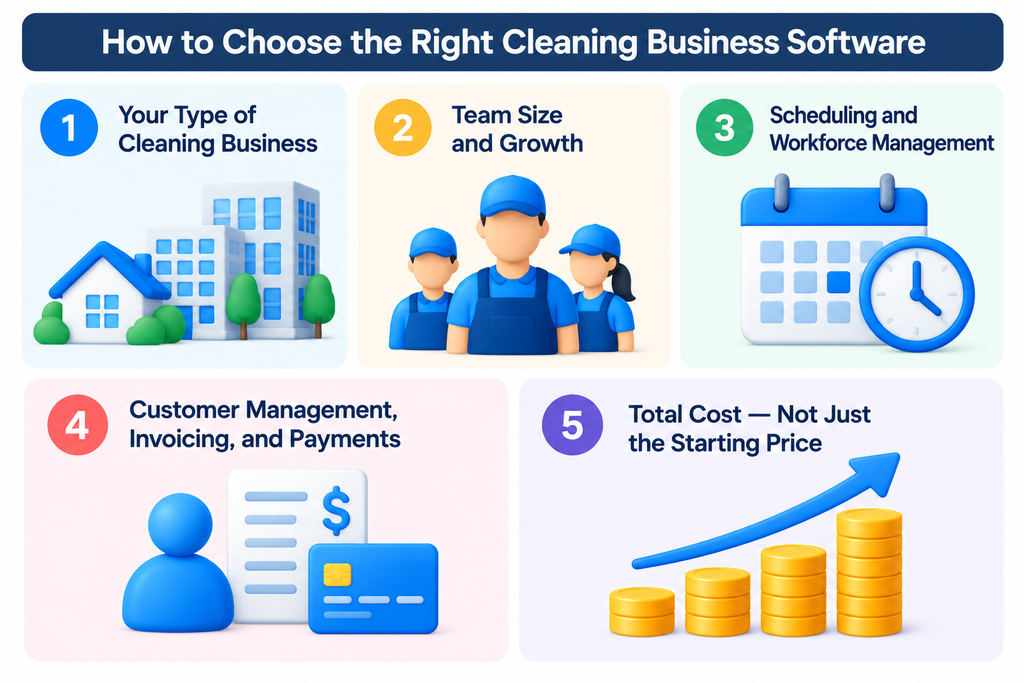
1. Your Type of Cleaning Business
Residential and commercial cleaning businesses often have very different software needs. Residential companies may prioritize recurring scheduling, customer communication, online booking, invoicing, and payments. Commercial cleaning companies may care more about employee time tracking, inspections, location management, cleaning instructions, and quality control.
Start by choosing software designed for—or at least well suited to—the way your cleaning business actually operates.
2. Team Size and Growth
Software that is inexpensive for one user can become much more expensive as your team grows. Before choosing a platform, calculate what it would cost not only today, but also with five or 10 users.
Pay attention to how each provider charges. Some platforms price by user, while others charge by cleaning location, job volume, or plan tier. A low starting price does not always mean a lower long-term cost.
If you expect to hire more cleaners over the next few years, choose a platform whose pricing model and features can scale with your business.
3. Scheduling and Workforce Management
Scheduling becomes increasingly important as a cleaning business adds employees, recurring jobs, and multiple service locations. Look for tools that make it easy to assign jobs, manage recurring schedules, track working hours, and communicate changes to cleaners.
Businesses with larger field teams may also benefit from GPS tracking, mobile clock-in and clock-out, checklists, route planning, and automated alerts for late or missed shifts.
The more complex your operation becomes, the more valuable these workforce-management features can be.
4. Customer Management, Invoicing, and Payments
If you want one platform to manage the customer side of your cleaning business, look beyond scheduling alone. Customer records, estimates, online booking, invoices, payment collection, and automated reminders can eliminate several separate administrative tools.
This is an important distinction between the products in this comparison. Platforms such as Jobber and Housecall Pro cover much more of the customer journey, while workforce-focused tools such as Connecteam are designed primarily to manage employees and internal operations.
Decide whether you need an all-in-one business management platform or whether you are comfortable combining specialized tools.
5. Total Cost — Not Just the Starting Price
Starting prices can be misleading because cleaning software companies use very different pricing models. One platform may charge per user, another by location, and another by monthly job volume.
Before subscribing, estimate the cost based on the way your business is likely to operate over the next few years. Include additional users, higher plan tiers, required features, onboarding fees, and any other recurring costs that apply to your situation.
This is why we included a three-year cost comparison earlier in this guide. The cheapest option today is not necessarily the cheapest—or the best value—as your cleaning business grows.
Ultimately, the best cleaning business software is the one that fits how your business operates today and can still make financial sense as you grow. Start with your biggest operational needs, then compare the features, pricing model, and three-year cost at the team size you expect to reach—not just the lowest advertised starting price.
Frequently Asked Questions
What is the best software for a cleaning business?
For most small-to-growing cleaning businesses, Jobber is our best overall pick because it combines customer management, scheduling, quotes, invoicing, payments, and field operations in one platform. However, the best choice depends on your business model. ZenMaid is particularly well suited to residential cleaning, while Swept is designed around commercial and janitorial operations.
What is the best software for a residential cleaning business?
ZenMaid is one of the strongest options for residential cleaning and maid service businesses because it is designed specifically around cleaning workflows. Jobber and Housecall Pro are also worth considering if you want broader field-service and customer-management capabilities.
What is the best software for a commercial cleaning business?
Swept is our top choice for commercial cleaning and janitorial businesses in this comparison. Its tools focus on managing cleaners across client locations, including scheduling, time tracking, cleaning instructions, inspections, checklists, and quality control.
Is there free cleaning business software?
Yes. Connecteam offers a free Small Business Plan for eligible businesses with up to 10 users, although it focuses primarily on workforce management rather than being a complete cleaning-business CRM. Other platforms in this comparison generally require a paid subscription, so always check current pricing and plan limits before choosing software based on cost alone.
How much does cleaning business software cost?
Pricing varies significantly. Entry-level options in this comparison start at free, while more advanced platforms can cost hundreds of dollars per month. Costs may be based on users, cleaning locations, job volume, or plan tier, so businesses should compare long-term costs rather than starting prices alone.
What features should cleaning business software have?
Important features can include scheduling, recurring jobs, customer management, estimates, invoicing, online payments, employee time tracking, mobile access, automated reminders, checklists, reporting, and online booking. Commercial cleaning companies may also need inspections, location management, geofencing, and quality-control tools.
Can cleaning business software replace QuickBooks?
Usually not completely. Cleaning business software may handle estimates, invoices, payments, job costing, and other financial workflows, but accounting software serves a broader bookkeeping and accounting function. Several platforms in this comparison integrate with QuickBooks Online rather than attempting to replace it entirely.
Is cleaning-specific software better than general field-service software?
Not necessarily. Cleaning-specific platforms can offer workflows that closely match residential or commercial cleaning operations, while broader field-service platforms may provide stronger customer-management, financial, dispatching, and growth features. The better choice depends on how specialized your operation is and which functions you want one platform to handle.
Final Verdict: Which Cleaning Business Software Should You Choose?
There is no single cleaning business software that is best for every company. The right choice depends on whether you run a residential or commercial cleaning business, how large your team is, and which parts of your operation you want the software to manage.
Jobber is our best overall pick for most small-to-growing cleaning businesses because it offers a strong balance of customer management, scheduling, quoting, invoicing, payments, and field operations.
ZenMaid is our preferred option for residential cleaning businesses, while Swept stands out for commercial cleaning and janitorial operations. Housecall Pro is a strong alternative for growing teams that need more advanced field-service tools, and Connecteam is particularly compelling for businesses focused primarily on workforce management.
MaidCentral is better suited to established cleaning companies that need deeper operational capabilities, while Maidily offers an accessible cleaning-specific option for newer businesses.
Before making a decision, compare the features you actually need with the cost of running the software at your expected team size and job volume. A platform that looks inexpensive today can become significantly more expensive as your business grows.
Our recommendation: Start with Jobber if you want the strongest all-around option for a cleaning business. If your needs are more specialized, compare it with ZenMaid for residential cleaning, Swept for commercial cleaning, or the other platforms above based on your team size, workflow, and three-year cost.
Compare Your Top Choices
Not sure which platform fits your cleaning business? Start with the tools that best match your operation, then compare current features and pricing before making a decision.