
Running a cleaning business becomes harder as your customer list grows.
At first, you may be able to manage leads, client details, follow-ups, and recurring jobs with a spreadsheet, calendar, and text messages. But once you are handling dozens or hundreds of customers, important information can quickly become scattered.
That is where customer relationship management (CRM) software can help.
A good CRM for a cleaning business gives you one place to track leads, customer information, service history, communication, quotes, recurring work, and follow-ups.
In this guide, we compare seven CRM tools that cleaning businesses can consider in 2026 and explain what to look for before choosing one.
Quick Comparison: Best CRM for Cleaning Businesses
| CRM | Best For | Cleaning-Specific | Scheduling | Quotes & Invoices |
|---|---|---|---|---|
| Jobber | Overall CRM and operations | Yes | Yes | Yes |
| Housecall Pro | Growing service businesses | Yes | Yes | Yes |
| ZenMaid | Residential maid services | Yes | Yes | Yes |
| ServiceM8 | Small field-service teams | No | Yes | Yes |
| HubSpot | Lead and sales management | No | Limited | No |
| Zoho CRM | Customizable sales CRM | No | Limited | No |
| Pipedrive | Managing sales pipelines | No | Limited | No |
The right choice depends on whether you need a complete cleaning business platform or primarily a system for managing leads and customer relationships.
What Is CRM Software for a Cleaning Business?
CRM stands for customer relationship management.
For a cleaning company, a CRM can act as the central record for each customer.
Instead of keeping contact details in one spreadsheet, job notes in another app, and follow-up reminders in your phone, the CRM connects that information to the customer.
A cleaning business CRM may help you track:
- New leads
- Customer contact information
- Property details
- Cleaning preferences
- Quotes and estimates
- Previous jobs
- Upcoming appointments
- Emails and text messages
- Invoices and payments
- Follow-up activity
- Lead sources
- Recurring customers
The goal is not simply to store names and phone numbers.
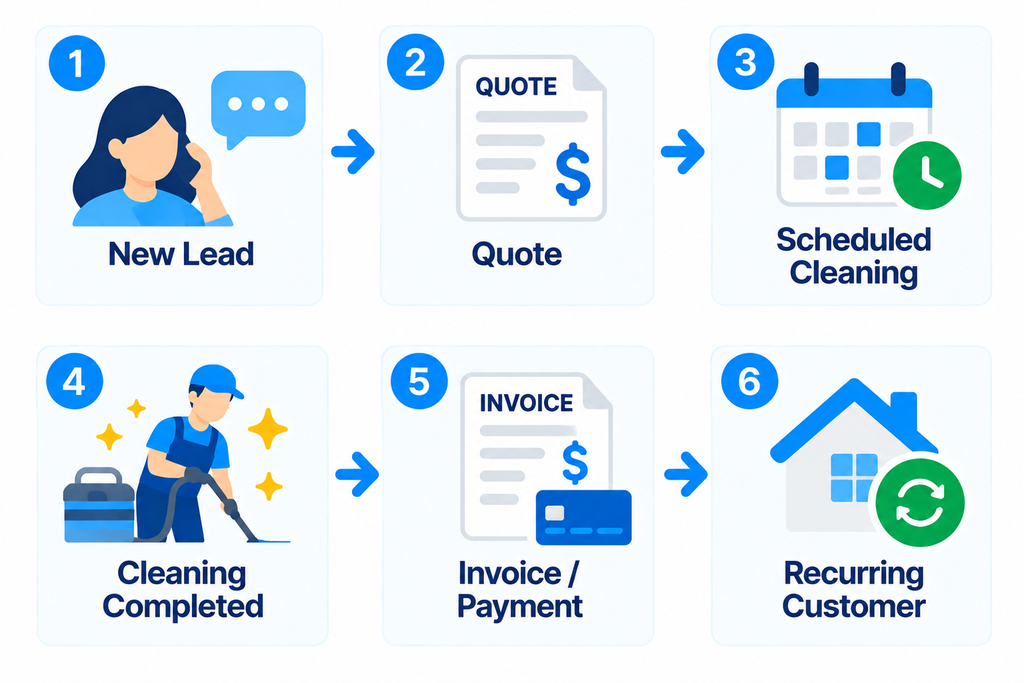
A useful CRM should help you understand where each customer is in your workflow—from the first inquiry to the latest completed cleaning.
What Should a Cleaning Business Look for in a CRM?
Generic CRM platforms are often built around sales teams.
Cleaning companies have different requirements.
A lead may request a quote, become a customer, book a recurring cleaning, change service frequency, add a deep clean, and eventually refer another customer.
Your CRM should make that history easy to follow.
When comparing platforms, pay particular attention to the following areas.
Client Profiles
You should be able to quickly find contact information, addresses, property details, service preferences, notes, and previous work.
Lead Management
A CRM should help you separate prospective customers from active customers and track which leads still require follow-up.
Communication History
Being able to see previous emails, texts, reminders, and customer interactions can prevent missed information.
Recurring Job Management
Recurring customers are especially important for residential cleaning businesses.
If the same platform can connect the customer record to weekly, biweekly, or monthly jobs, administration becomes much easier.
Quotes and Invoices
Some CRMs focus almost entirely on sales.
Others allow cleaning companies to move a customer from inquiry to quote, job, invoice, and payment without switching platforms.
Mobile Access
Owners and cleaners often need customer information while away from the office.
A useful mobile experience can make client notes and job details available where the work actually happens.
1. Jobber
Best for: Cleaning businesses that want CRM, scheduling, quotes, and invoicing in one system
Jobber is built for home and field service businesses and includes dedicated tools for cleaning companies.
Its client management system connects customer information with requests, quotes, jobs, invoices, and communication history.
For cleaning businesses, this is important because the CRM is not isolated from daily operations.
A customer record can include property details, job history, communication, and billing information while also connecting directly to scheduled work.
Key CRM Features
- Client profiles
- Property details
- Lead management
- Job history
- Communication history
- Custom fields
- Quotes
- Scheduling
- Recurring jobs
- Invoicing and payments
- Client portal
- Automated customer communication
Where Jobber Stands Out
Jobber’s biggest advantage is that the customer record connects directly to the operational side of the cleaning business.
You do not need one system for CRM and another system for scheduling every cleaning.
That makes it particularly useful for companies moving beyond spreadsheets and trying to build a repeatable workflow.
Potential Drawback
Businesses that only need a simple sales CRM may not need the broader operational features included in a field-service platform.
OpsButler take: Jobber is one of the strongest options to consider when your priority is keeping customers, jobs, quotes, invoices, and communication connected in one place.
For a deeper look at the platform, read our Jobber Review: Is It Worth It for Cleaning Businesses?.
2. Housecall Pro
Best for: Growing cleaning companies that want an all-in-one service platform
Housecall Pro is another field-service platform that combines customer management with day-to-day business operations.
For cleaning companies, it supports recurring jobs, scheduling, customer communication, invoicing, payments, and a customer portal.
Key CRM Features
- Customer profiles
- Lead and customer management
- Scheduling
- Recurring jobs
- Estimates
- Invoicing
- Payments
- Automated customer messages
- Customer portal
- Mobile access
Where Housecall Pro Stands Out
Housecall Pro can work well for businesses that want customer management tied closely to scheduling and field operations.
Its recurring-job functionality is particularly relevant for cleaning companies with weekly, biweekly, or monthly clients.
Potential Drawback
Like Jobber, Housecall Pro may provide more functionality than a solo cleaner needs if the only requirement is maintaining a basic customer database.
3. ZenMaid
Best for: Residential maid and house cleaning companies
ZenMaid is designed specifically for maid services.
Rather than adapting a general CRM to a cleaning workflow, it focuses on the recurring appointments and customer management needs of residential cleaning companies.
Key CRM Features
- Customer profiles
- Appointment history
- Customer notes
- Scheduling
- Recurring appointments
- Automated communication
- Cleaner management
- Mobile access
- Reporting
Where ZenMaid Stands Out
The biggest difference is specialization.
ZenMaid was designed around maid-service operations, which can make it attractive for residential cleaning companies that do not need a broader field-service platform.
Potential Drawback
Businesses offering a wider range of field services—or companies that need a more traditional sales pipeline—may prefer a broader platform.
4. ServiceM8
Best for: Small field-service businesses that want CRM and job management together
ServiceM8 combines customer records with scheduling, quoting, invoicing, job management, and field-service workflows.
It is not specifically a cleaning CRM, but its service-business structure can fit companies that need customer information tied directly to jobs.
Key CRM Features
- Customer records
- Job history
- Scheduling
- Quotes
- Invoices
- Customer communication
- Job notes
- Mobile field management
Where ServiceM8 Stands Out
ServiceM8 is worth considering if you want customer management to remain closely connected to the work being performed in the field.
Potential Drawback
Cleaning businesses should confirm that its workflow and device support fit their team before committing to the platform.
5. HubSpot
Best for: Cleaning businesses focused heavily on lead generation and sales
HubSpot is a general CRM rather than cleaning business software.
Its strength is managing contacts, leads, sales activity, and marketing.
This can be useful for larger cleaning companies—especially commercial cleaning businesses—that have a structured sales process before a customer ever reaches the scheduling stage.
Key CRM Features
- Contact management
- Lead tracking
- Sales pipelines
- Tasks and follow-ups
- Email tracking
- Marketing tools
- Reporting
- Integrations
Where HubSpot Stands Out
HubSpot is much more sales-oriented than most cleaning-specific platforms.
For a commercial cleaning company pursuing contracts and managing a long sales cycle, that can be valuable.
Potential Drawback
HubSpot is not designed to run cleaning jobs.
You may still need separate software for scheduling cleaners, recurring visits, job management, and service invoicing.
6. Zoho CRM
Best for: Businesses that want a highly customizable CRM
Zoho CRM is another general-purpose customer relationship management platform.
It can be configured around leads, contacts, deals, follow-ups, automation, and reporting.
Key CRM Features
- Lead management
- Contact management
- Sales pipelines
- Workflow automation
- Tasks
- Email integration
- Reporting
- Custom fields
Where Zoho CRM Stands Out
Customization is one of the main reasons to consider Zoho CRM.
A cleaning company with a defined sales process may be able to configure the system around its own workflow rather than adopting a cleaning-specific structure.
Potential Drawback
That flexibility also means more setup.
Cleaning businesses looking for scheduling, recurring jobs, cleaner dispatching, and invoicing out of the box may find a field-service CRM simpler.
7. Pipedrive
Best for: Cleaning companies that want a visual sales pipeline
Pipedrive is primarily a sales CRM.
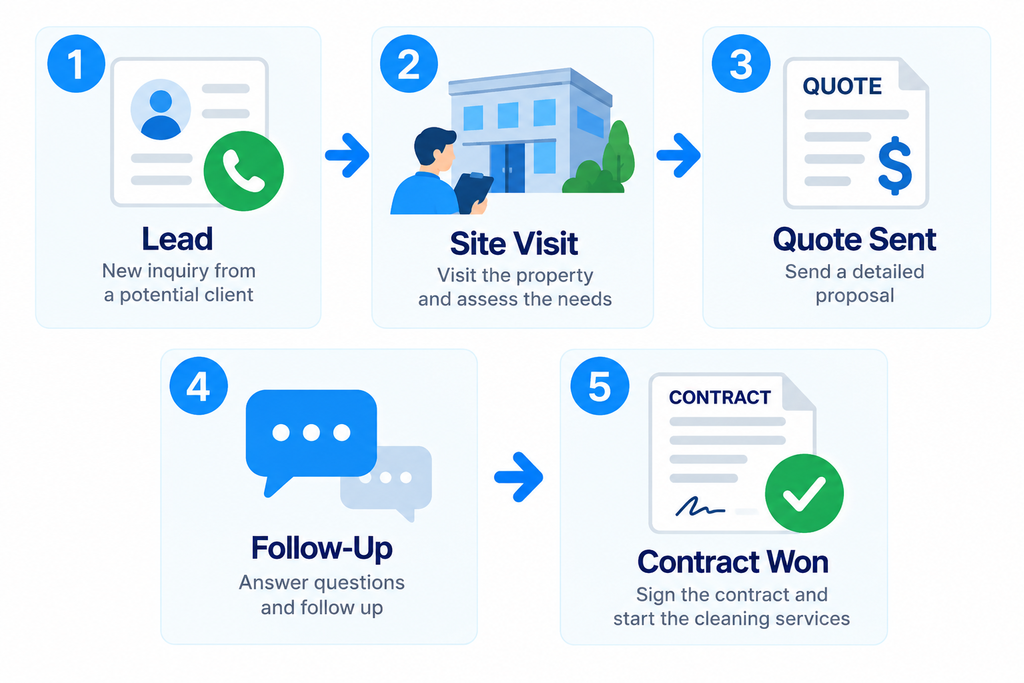
It helps businesses organize leads and opportunities according to where they are in the sales process.
For example, a commercial cleaning company could build stages such as:
Key CRM Features
- Contact management
- Visual sales pipelines
- Deal tracking
- Activities and reminders
- Email integration
- Sales automation
- Reporting
Where Pipedrive Stands Out
Its visual pipeline makes it easy to see which opportunities need attention.
That can be particularly useful for commercial cleaning businesses pursuing larger contracts rather than processing high volumes of simple residential bookings.
Potential Drawback
Pipedrive does not replace cleaning operations software.
Once a deal becomes a customer, you may still need another platform for scheduling, job management, invoicing, and field operations.
Cleaning-Specific CRM vs. General CRM
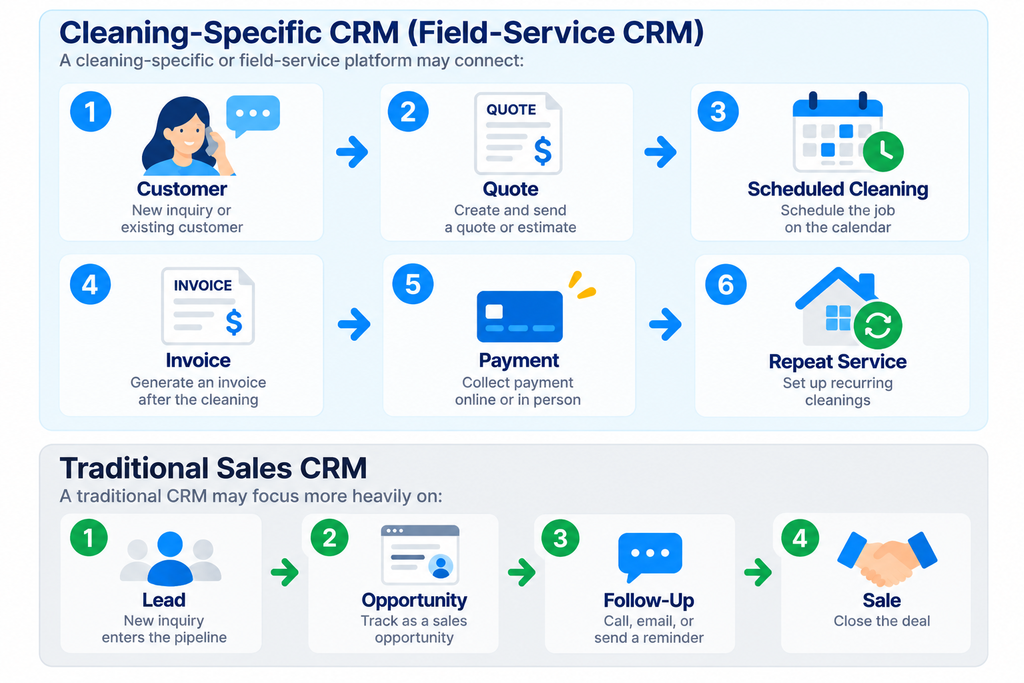
One of the biggest decisions is whether to choose cleaning or field-service software with CRM features or a traditional sales CRM.
Neither approach is automatically better.
A residential cleaning company with hundreds of recurring visits may benefit more from operational integration.
A commercial cleaning company pursuing larger contracts may care more about pipeline management and sales follow-up.
Which CRM Is Best for a Small Cleaning Business?
For many small cleaning businesses, simplicity matters more than having the largest feature list.
If you currently manage customers using spreadsheets, text messages, and a calendar, the biggest improvement usually comes from putting customer and job information into one reliable system.
Before buying software, ask:
- Can I see a customer’s complete history quickly?
- Can I tell which leads still need follow-up?
- Can I manage recurring customers?
- Can I access information from my phone?
- Can the system connect customers to quotes and jobs?
- Will it still work when I hire additional cleaners?
- Am I paying for features I will actually use?
A CRM should remove administrative work—not create another system you have to maintain.
When Should You Start Using a CRM?
You do not necessarily need CRM software on the first day of your cleaning business.
A spreadsheet may work when you have only a few customers.
The need becomes much clearer when you start experiencing problems such as:
- Forgetting to follow up with leads
- Searching through old messages for customer information
- Losing track of previous quotes
- Managing recurring customers manually
- Keeping client notes in multiple places
- Having employees ask you for information before every job
- Missing opportunities to contact previous customers
If these problems are becoming common, moving to a CRM can create a more reliable operating system for the business.
If you are still building your company from scratch, start with our How to Start a Cleaning Business guide.
CRM vs. Scheduling Software: What’s the Difference?
There is significant overlap.
CRM software primarily organizes relationships with leads and customers.
Scheduling software primarily organizes when jobs happen and who performs them.
For a cleaning business, however, these systems often need to work together.
A customer profile is much more useful when you can also see:
- Their next cleaning
- Previous visits
- Assigned cleaner
- Service frequency
- Job notes
- Quote history
- Invoice status
That is why many cleaning companies choose software that combines CRM and scheduling.
If scheduling is your main priority, see our Best Scheduling Software for Cleaning Businesses.
Do You Need a Separate CRM and Cleaning Business Software?
Usually, a small cleaning company should avoid adding software unless there is a clear reason for it.
Running a dedicated CRM plus separate scheduling, quoting, invoicing, and payment systems can create duplicate customer records and additional administration.
For many residential cleaning companies, an all-in-one service platform may be simpler.
Separate systems can make more sense when you have a specialized sales process.
For example, a commercial cleaning company may use a sales CRM to manage contract opportunities while using field-service software to manage work after a contract is won.
The right setup depends on how complicated your sales process is.
How to Choose the Right CRM
Do not choose a CRM based only on the number of features.
Start with your actual workflow.
Write down what happens from the moment someone contacts your cleaning company until they become a recurring customer.
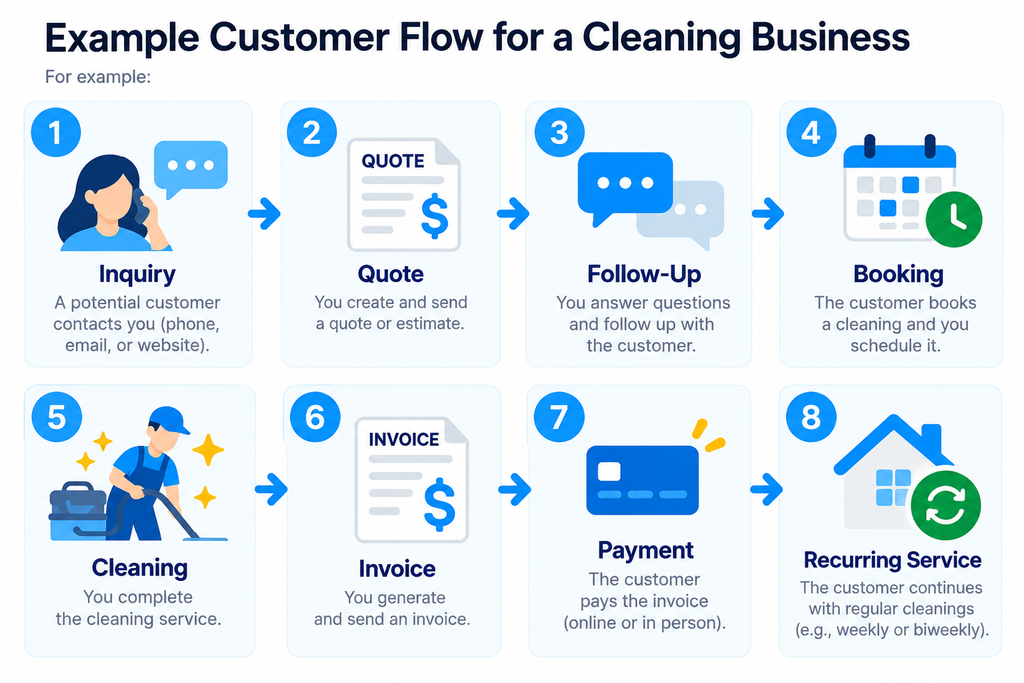
Then identify where information currently gets lost or where you spend unnecessary time.
Choose software that solves those problems with the fewest unnecessary steps.
Before committing, test the platform with real scenarios from your business:
- Add a new lead.
- Create a customer profile.
- Record property instructions.
- Send or record a quote.
- Schedule a recurring cleaning.
- Find the customer’s previous service history.
- Check what your cleaner can see in the field.
- Create an invoice.
- Record or collect payment.
- Find the entire customer history again.
A feature list can look impressive.
What matters is whether the workflow feels simple when you actually use it.
Final Take
The best CRM for a cleaning business is the one that keeps customer information organized without making daily operations more complicated.
For businesses that want customer management integrated with scheduling, quotes, jobs, invoices, and payments, platforms such as Jobber and Housecall Pro are natural options to evaluate.
Residential maid services may also want to consider cleaning-specific platforms such as ZenMaid.
Businesses with a more complex sales process—particularly commercial cleaning companies—may benefit from traditional CRM platforms such as HubSpot, Zoho CRM, or Pipedrive.
Start with the problems you need to solve, test the workflow, and avoid paying for complexity you do not need.
If you want a broader comparison beyond CRM features, see our Best Cleaning Business Software: 7 Tools Compared.