
Jobber can replace several tools in a cleaning business.
It can manage customers, schedule jobs, send quotes, create invoices, collect payments, and automate parts of your customer communication.
But before paying for software every month, one question matters:
How much does Jobber actually cost—and which plan does a cleaning business really need?
Jobber offers multiple plans, and the price can change depending on your team size and whether you choose monthly billing, a one-year commitment, or annual billing.
In this guide, we break down Jobber pricing, explain what changes between plans, and help you decide which option may make sense for your cleaning business.
Jobber Pricing at a Glance
Jobber currently offers four main plans:
| Plan | Starting Price* | Best Fit |
|---|---|---|
| Core | $29/month | Solo cleaners and very small businesses |
| Connect | $99/month | Businesses that need more automation |
| Grow | $149/month | Growing businesses that need stronger sales and profitability tools |
| Plus | $399/month | Larger teams with more complex operations |
*Starting prices reflect Jobber’s annual billing options at the time of publication. Pricing can vary based on team size and billing method.
Jobber lists its prices in U.S. dollars.
Annual billing generally provides the lowest advertised monthly equivalent, while monthly billing without a commitment costs more.
Because Jobber can change its pricing and promotions, always check the current pricing page before subscribing.
How Jobber Pricing Works
Jobber pricing is not simply one fixed price per plan.
Your actual subscription cost can depend on:
- The plan you choose
- The number of users you need
- Whether you pay annually
- Whether you make a one-year commitment with monthly payments
- Whether you choose month-to-month billing
- Optional products or services you add
This matters for cleaning companies because software that looks affordable for one owner can become a much larger expense once multiple office staff, managers, or cleaners need access.
Before comparing plans, decide who actually needs a Jobber user account.
Jobber Core Plan
Starting at: $29/month with annual billing
Core is Jobber’s entry-level plan.
It supports one user and is designed for businesses that need the basic system for organizing customers and jobs without more advanced automation.
Core Includes
- Client management
- Lead management
- Online booking
- Scheduling
- Quotes
- Jobs
- Invoicing
- Online payments
- Client hub
- Reporting
- App marketplace access
Who Is Core Best For?
Core can make sense for a solo cleaner or owner-operator who wants to move beyond spreadsheets, text messages, and separate invoicing tools.
For example:
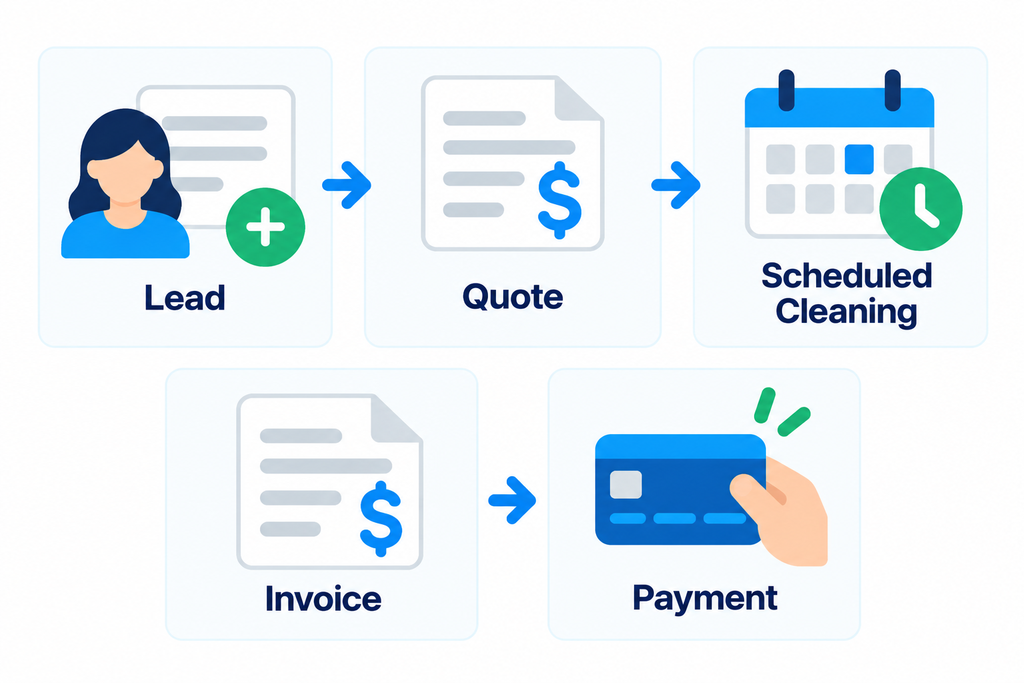
If one person handles most of the administrative work, Core may provide enough structure without paying for features designed for larger teams.
Where Core Becomes Limited
The biggest limitation is not necessarily the basic customer and job management.
It is what happens when you want more automation and team functionality.
Features such as automated client reminders, automated quote and invoice follow-ups, checklists, time and expense tracking, and QuickBooks Online synchronization are available on higher plans.
Jobber Connect Plan
Starting at: $99/month with annual billing
Connect builds on Core by adding features designed to reduce repetitive administrative work.
Jobber describes Connect as a plan for businesses that want more efficient processes and stronger customer communication.
Connect Adds Features Such As
- Automated client reminders
- Automatic payment collection
- Job checklists
- Automated quote follow-ups
- Automated invoice follow-ups
- QuickBooks Online synchronization
- Time tracking
- Expense tracking
Depending on the configuration selected, Connect can also support additional users.
Who Is Connect Best For?
Connect becomes more relevant when you are no longer managing every job personally.
Imagine a cleaning business with recurring customers and multiple cleaners.
Every week you may need to:
- Remind customers about upcoming appointments
- Give cleaners consistent job instructions
- Track employee time
- Follow up on unpaid invoices
- Follow up on quotes that have not been approved
Doing those tasks manually may be manageable with ten customers.
It becomes much more difficult with dozens or hundreds.
Automation is therefore the main reason a cleaning business might move from Core to Connect.
Jobber Grow Plan
Starting at: $149/month with annual billing
Grow adds more advanced sales, communication, and profitability tools.
It is aimed at businesses that are trying to win larger jobs and understand which work is actually profitable.
Grow Adds Features Such As
- More customizable quotes
- Optional quote line items
- Two-way SMS communication
- Custom workflow automations
- Job costing
- Additional profitability tools
- More advanced sales functionality
Who Is Grow Best For?
Grow may make sense when your cleaning business has moved beyond simply organizing appointments.
For example, you may want to know:
Which cleaning jobs are actually profitable after labor and other job costs?
That question becomes increasingly important as you hire employees.
Revenue alone does not tell you whether a job is worth keeping.
Job costing can help connect the amount you charge with the costs associated with completing the work.
If profitability is already a concern, you can also use our Cleaning Business Profit Margin Calculator to estimate how much of your revenue you are actually keeping.
Jobber Plus Plan
Starting at: $399/month with annual billing
Plus is Jobber’s highest standard tier.
It is designed for larger home-service businesses that need greater control across teams, jobs, customer acquisition, and profitability.
Plus Adds More Advanced Tools Around
- Team collaboration
- Job files and media
- Job costing automation
- Lead pipeline management
- Marketing
- AI-powered receptionist functionality
- Onboarding support
- Premium support
Pricing also changes depending on the number of users included.
Who Is Plus Best For?
Plus is unlikely to be the starting point for a small owner-operated cleaning business.
It becomes more relevant when software is supporting a larger organization with multiple employees, crews, managers, and a meaningful volume of leads and jobs.
At that stage, the question changes from:
“What is the cheapest plan?”
to:
“How much administrative work can this system remove from the business?”
Which Jobber Plan Is Best for a Cleaning Business?
The right plan depends less on revenue and more on operational complexity.
Solo Cleaner or Owner-Operator
Start by evaluating Core.
You may not need advanced automation if one person handles customers, scheduling, quotes, and invoices.
Small Cleaning Team
Compare Core and Connect.
Connect becomes more attractive when automated reminders, checklists, follow-ups, employee time tracking, and accounting synchronization can replace manual work.
Growing Cleaning Company
Compare Connect and Grow.
Grow becomes more relevant when profitability, sales automation, more sophisticated quotes, and customer communication become important.
Larger Multi-Crew Operation
Evaluate Grow and Plus.
At this stage, team coordination, profitability tracking, lead management, automation, and support may justify a higher software budget.
The Real Cost of Jobber Is Not Just the Subscription
The subscription price is the easiest cost to see.
But software should be evaluated based on the total effect on your business.
Consider:
- Monthly or annual subscription cost
- Number of users required
- Payment processing costs
- Optional products or add-ons
- Time required for setup
- Time required to train employees
- Time saved through automation
- Reduction in missed follow-ups
- Reduction in scheduling mistakes
- Faster invoicing and payment collection
For example, paying more for software may make financial sense if it saves several hours of administrative work every week.
On the other hand, expensive automation has little value if your cleaning business is small enough that you rarely use it.
A Simple Way to Calculate Whether Jobber Is Worth the Cost
Do not evaluate software only by asking whether $29, $99, or $149 per month sounds expensive.
Estimate the value of the time it could save.
For example:
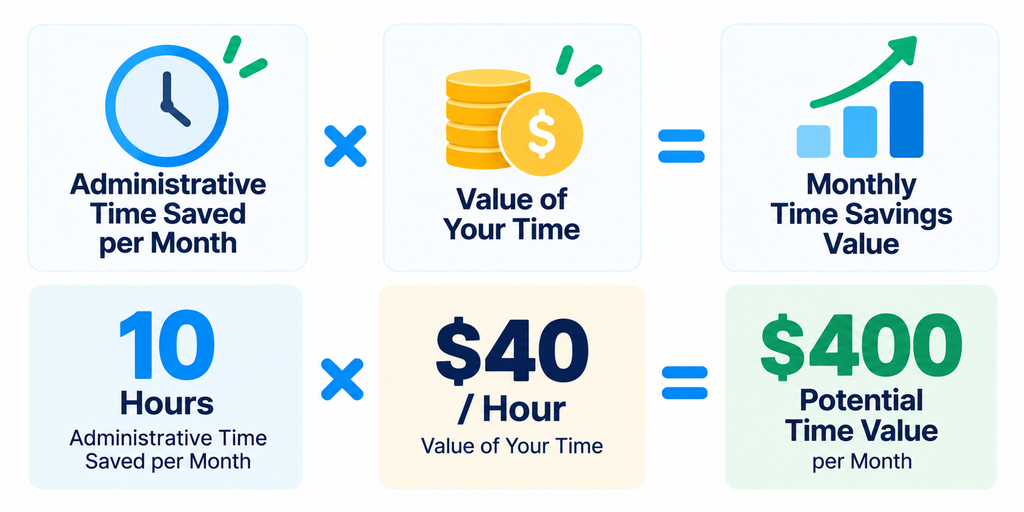
That does not automatically mean a $149 subscription is profitable.
But it gives you a better framework than looking at the subscription price alone.
You should also consider whether the software helps you:
- Respond to leads faster
- Follow up on quotes
- Reduce missed appointments
- Collect payments faster
- Keep recurring customers organized
- Reduce administrative mistakes
The software only needs to create enough operational or financial value to justify its total cost.
Monthly vs. Annual Jobber Pricing
Jobber currently offers multiple payment structures.
Monthly With No Commitment
This provides the most flexibility but generally carries the highest monthly price.
It can make sense if you are still testing whether Jobber fits your business.
Monthly With a One-Year Commitment
Jobber also offers discounted pricing with a one-year commitment while allowing payments to be spread across the year.
Annual Billing
Annual billing generally provides the lowest advertised monthly equivalent.
However, the annual amount is paid upfront.
The cheapest monthly equivalent is not automatically the best option.
A cleaning business should first confirm that the software fits its workflow before making a longer commitment.
Does Jobber Offer a Free Trial?
Yes.
Jobber offers a 14-day free trial, and its official trial information states that no credit card is required to start.
That gives you an opportunity to test the platform before choosing a paid plan.
Do not spend the trial simply clicking through menus.
Use it to recreate real workflows from your business.
For example:
- Add a customer.
- Create a quote.
- Schedule a cleaning.
- Create a recurring job.
- Add job instructions.
- Complete the job.
- Create an invoice.
- Record or collect a payment.
- Find the customer’s complete history.
- Repeat the process from your phone.
If you have employees, also test what they can see and do from their accounts.
That will tell you much more than comparing feature lists.
Is Jobber Worth It for a Cleaning Business?
Jobber can be worth considering when you want several operational functions connected in one system.
Instead of managing:
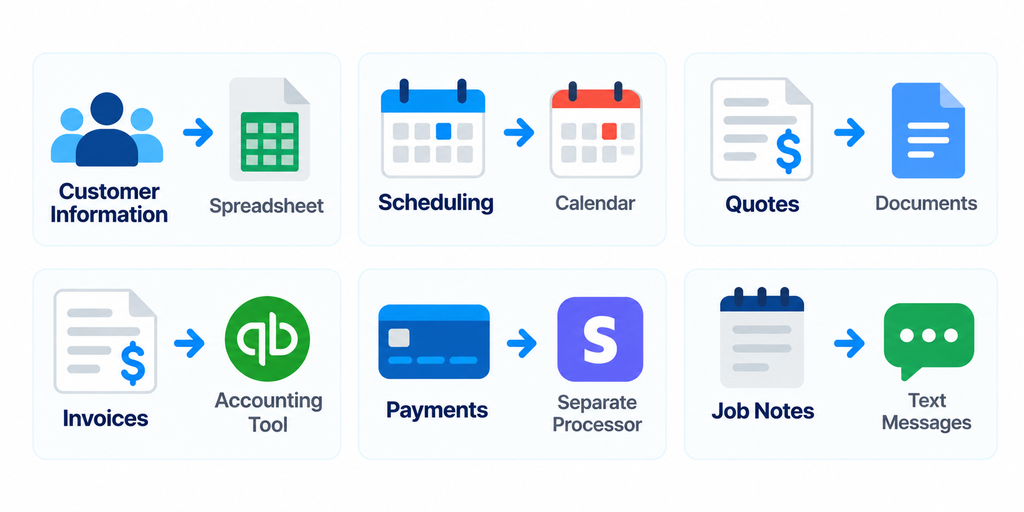
Jobber can connect more of that workflow around the customer and job.
That becomes increasingly valuable as the number of customers and employees grows.
However, a solo cleaner with a small customer base may not need every automation or management feature.
The goal should not be to buy the most powerful plan.
It should be to buy the least expensive plan that reliably solves your current operational problems.
For a broader look at the platform, read our Jobber Review: Is It Worth It for Cleaning Businesses?.
When Jobber May Be Too Expensive
Jobber may be harder to justify when:
- You have only a few customers
- One person handles all administration
- You rarely send formal quotes
- You do not need employee scheduling
- You do not need automated customer communication
- You already have inexpensive tools that work well together
A $29 subscription is very different from a larger plan supporting a growing team.
That is why you should compare the cost of the specific configuration you need rather than simply looking at Jobber’s lowest advertised price.
What If Jobber Pricing Does Not Fit Your Business?
Do not force your workflow into a platform simply because it is popular.
Different cleaning businesses prioritize different things.
You may care more about:
- Cleaning-specific workflows
- Online booking
- Lower software costs
- Simpler scheduling
- Larger-team dispatching
- Sales pipeline management
If Jobber’s pricing or feature structure does not fit your business, compare the alternatives before committing.
See our Best Jobber Alternatives for Cleaning Businesses for seven other options.
Final Take
Jobber pricing starts relatively low for a solo user, but the total cost can increase as you add more advanced features and support a larger team.
Core can provide the basic structure a solo cleaning business needs.
Connect adds automation that becomes more useful as recurring customers and employees increase.
Grow introduces stronger sales and profitability tools.
Plus is designed for larger operations that need more advanced team, lead, and business-management capabilities.
Do not choose a plan based only on the feature list.
Start with the operational problem you are trying to solve, test that workflow during the free trial, and calculate whether the time and administrative work saved justify the subscription cost.
If you are still deciding whether Jobber itself is the right platform, start with our Jobber Review and then compare the Best Jobber Alternatives for Cleaning Businesses.