
If you run a cleaning business, Jobber is one of the first platforms you are likely to encounter.
It combines customer management, scheduling, quotes, jobs, invoicing, payments, and communication in one system.
But that does not mean it is the right fit for every cleaning company.
Some businesses want software built specifically for residential cleaning. Others want simpler scheduling, different pricing structures, stronger online booking, or more advanced tools for managing a growing field-service team.
In this guide, we compare seven Jobber alternatives for cleaning businesses and explain where each option may make more sense.
Quick Comparison: Best Jobber Alternatives for Cleaning Businesses
| Software | Best For | Cleaning-Specific | Scheduling | Quotes & Invoices |
|---|---|---|---|---|
| Housecall Pro | Growing service businesses | Yes | Yes | Yes |
| ZenMaid | Residential maid services | Yes | Yes | Yes |
| ServiceM8 | Small field-service teams | No | Yes | Yes |
| BookingKoala | Online booking and automation | Yes | Yes | Yes |
| MaidCentral | Established residential cleaning companies | Yes | Yes | Yes |
| Workiz | Larger field-service operations | No | Yes | Yes |
| HubSpot | Sales and lead management | No | Limited | Limited |
The best Jobber alternative depends on why you are considering switching—or why Jobber does not fit your business in the first place.
Why Look for a Jobber Alternative?
Jobber covers many of the core tasks involved in running a cleaning business.
That includes customer records, scheduling, quotes, recurring jobs, invoicing, payments, and customer communication.
For a deeper look at those features, see our Jobber Review: Is It Worth It for Cleaning Businesses?.
However, different cleaning companies have different priorities.
You may want an alternative if you need:
- Software designed specifically around maid-service workflows
- A stronger online booking experience
- A simpler system for a small team
- Different pricing as your team grows
- More advanced dispatching tools
- More flexibility around sales pipelines
- Cleaning-specific reporting or employee management
- A platform focused primarily on leads rather than field operations
The important question is not whether another platform has more features than Jobber.
It is whether those features better match the way your cleaning business actually operates.
What to Compare Before Replacing Jobber
Switching business software can create significant work.
Customer records, recurring schedules, pricing, invoices, employee information, and operating processes may all need to move.
Before changing platforms, identify the specific problem you are trying to solve.
Compare alternatives based on:
- Customer management
- Recurring job scheduling
- Employee scheduling
- Quotes and estimates
- Invoicing
- Payment collection
- Online booking
- Automated reminders
- Mobile access
- Customer communication
- Reporting
- Integrations
- Ease of setup
- Cost as your team grows
A cheaper platform is not necessarily a better alternative if it creates additional administrative work.
Likewise, paying for more features does not help if your business never uses them.
1. Housecall Pro
Best for: Growing cleaning businesses that want an all-in-one field-service platform
Housecall Pro is one of the closest alternatives to Jobber in terms of overall purpose.
It is built for home-service businesses and combines customer management with scheduling, dispatching, estimates, invoicing, payments, and communication.
For cleaning companies, it also supports recurring jobs, which is important when managing weekly, biweekly, or monthly customers.
Key Features
- Customer management
- Scheduling and dispatching
- Recurring jobs
- Estimates
- Invoicing
- Payments
- Automated customer messages
- Online booking
- Customer portal
- Mobile access
Where Housecall Pro Stands Out
Housecall Pro is worth considering if you like the idea of Jobber but want to compare it with another broad field-service platform.
Both platforms aim to connect the customer relationship with the actual work being performed.
That means you can manage much of the customer lifecycle without building a collection of separate tools.
Potential Drawback
Businesses looking for software built exclusively around residential maid-service operations may prefer a more specialized platform.
2. ZenMaid
Best for: Residential maid and house cleaning businesses
ZenMaid takes a different approach.
Instead of serving many types of field-service businesses, it is designed specifically for maid services.
That specialization makes it particularly relevant for residential cleaning companies managing recurring appointments and cleaning teams.
Key Features
- Cleaning business scheduling
- Recurring appointments
- Customer management
- Automated customer communication
- Cleaner communication
- Digital checklists
- Online booking forms
- Invoicing and online payments
- Payroll tools
- Reporting
- Mobile access
Where ZenMaid Stands Out
The main advantage is focus.
Its workflows are designed around maid-service operations rather than being adapted from a broader field-service platform.
For a residential cleaning company, that can reduce the number of features and concepts that are irrelevant to daily operations.
Potential Drawback
Companies that provide multiple types of field services—or need broader dispatching and operational tools—may prefer a more general platform such as Jobber or Housecall Pro.
3. ServiceM8
Best for: Small service teams that want job management and simple operational tools
ServiceM8 is a field-service management platform that connects customers, jobs, scheduling, quotes, invoices, payments, and communication.
It is not designed exclusively for cleaning companies, but the underlying workflow can fit service businesses that send employees into the field.
Key Features
- Customer and job records
- Scheduling
- Recurring jobs
- Quotes
- Invoicing
- Payments
- Online booking
- Customer communication
- Job history
- Mobile field access
- Reporting
- Accounting integrations
Where ServiceM8 Stands Out
ServiceM8 uses job-based plans rather than charging paid plans on a per-user basis.
That structure can be worth comparing if your team size is growing and software cost per employee is an important consideration.
Its customer history also keeps notes, photos, messages, and previous work connected to the client.
Potential Drawback
Cleaning companies should check whether its workflow and mobile-device support fit the way their cleaners actually work before migrating.
4. BookingKoala
Best for: Cleaning businesses that prioritize online booking and automated customer purchasing
BookingKoala is especially interesting for cleaning companies that want customers to book services online.
Its booking forms can support different service types, pricing structures, locations, and scheduling rules.
That makes it useful for businesses trying to turn website visitors directly into booked cleaning appointments.
Key Features
- Online booking forms
- Flexible pricing rules
- Customer scheduling
- Service-area management
- Multiple service categories
- Customer payments
- Automatic charges
- Provider management
- Customer accounts
- Marketing and automation tools
Where BookingKoala Stands Out
The online booking experience is a major reason to consider BookingKoala.
For example, a cleaning company could allow customers to select:
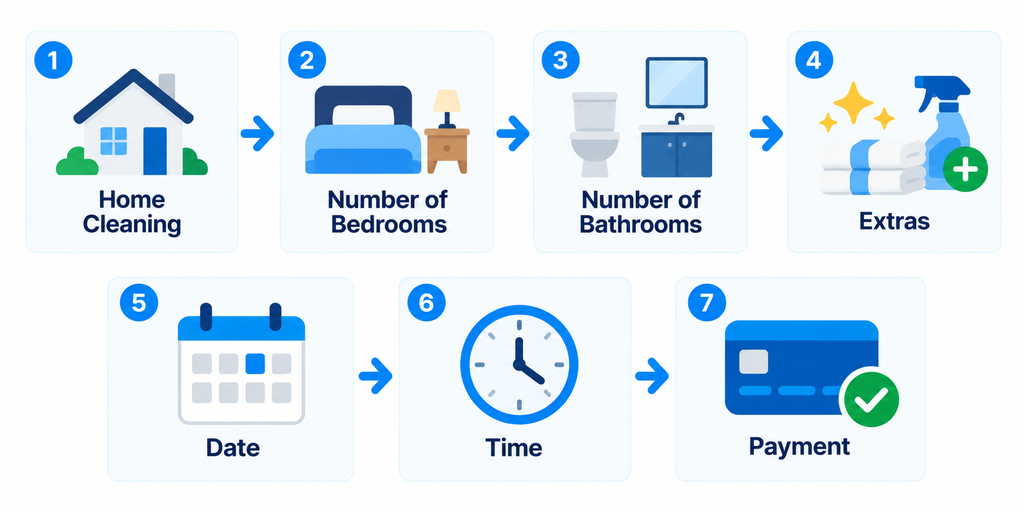
This can reduce the amount of manual quoting and scheduling required for standardized residential cleaning services.
Potential Drawback
Businesses that rely heavily on complex field-service dispatching or highly customized sales processes should make sure the platform fits those workflows before switching.
5. MaidCentral
Best for: Established residential cleaning companies that want deeper cleaning-specific operations
MaidCentral is built specifically for the residential cleaning industry.
Its focus extends beyond basic scheduling into areas such as customer management, employee scheduling, quality measurement, payroll reporting, and business performance.
Key Features
- Customer management
- Scheduling and dispatch
- Recurring cleaning schedules
- Customer portal
- Mobile technician access
- Batch billing and invoicing
- Payroll reporting
- Quality measurement
- Reporting and KPIs
- Customer communication
Where MaidCentral Stands Out
MaidCentral is particularly relevant for cleaning companies that have moved beyond the owner-operator stage and want software designed around managing an established residential cleaning operation.
Its cleaning-specific reporting and operational tools can be more relevant than generic field-service features for companies with multiple cleaners and recurring customers.
Potential Drawback
A very small cleaning business may not need the operational depth of a platform designed around more established cleaning companies.
6. Workiz
Best for: Growing field-service teams that need stronger scheduling, dispatching, and automation
Workiz is another broad field-service platform.
It combines customer management with scheduling, dispatching, estimates, invoicing, online payments, communication, reporting, and automation.
Its scheduling tools are designed to help businesses assign jobs based on factors such as availability, service area, and employee skills.
Key Features
- Client CRM
- Scheduling
- Dispatching
- Estimates and proposals
- Invoicing
- Online payments
- Online booking
- Customer communication
- Automations
- Mobile access
- Reporting
- Service areas
Where Workiz Stands Out
Workiz becomes particularly interesting when dispatching and team coordination are major operational problems.
For cleaning companies with multiple crews working across a larger service area, stronger dispatching tools may matter more than simply having a customer database.
Potential Drawback
Smaller residential cleaning companies may find that they do not need the broader field-service functionality available in the platform.
7. HubSpot
Best for: Cleaning companies that need a stronger sales CRM
HubSpot is fundamentally different from most of the alternatives above.
It is a general CRM platform rather than cleaning business management software.
Its strength is managing contacts, leads, sales pipelines, follow-ups, marketing, and customer relationships.
Key Features
- Contact management
- Lead tracking
- Sales pipelines
- Tasks and reminders
- Email tracking
- Marketing tools
- Automation
- Reporting
- Integrations
Where HubSpot Stands Out
HubSpot can make sense for commercial cleaning companies with a longer sales cycle.
For example:
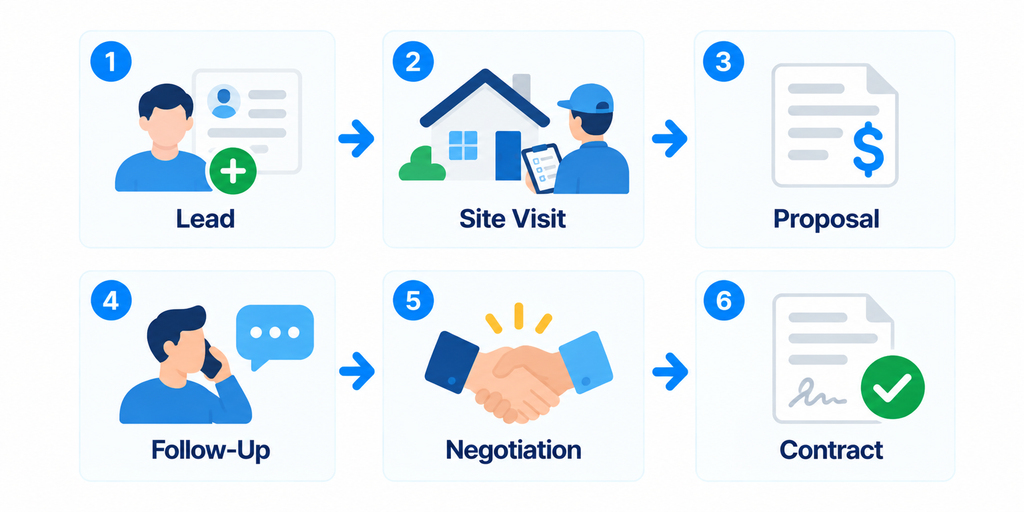
That process is closer to traditional B2B sales than a residential customer simply booking a recurring house cleaning.
Potential Drawback
HubSpot does not replace dedicated cleaning operations software.
You may still need another system for cleaner scheduling, recurring visits, dispatching, job management, and service invoicing.
Which Jobber Alternative Is Best for Your Cleaning Business?
There is no single replacement that makes sense for every company.
The better approach is to match the software to your operating model.
If You Run a Residential Maid Service
Start by comparing:
- ZenMaid
- MaidCentral
- BookingKoala
These platforms have stronger connections to residential cleaning workflows.
If You Want an All-in-One Field-Service Platform
Compare:
- Housecall Pro
- ServiceM8
- Workiz
These platforms connect customer information with jobs, scheduling, and other operational tasks.
If Online Booking Is Your Priority
BookingKoala deserves particular attention if you want customers to configure and book standardized cleaning services through your website.
If Sales Management Is Your Priority
HubSpot may be more appropriate for a commercial cleaning company with a longer lead-to-contract process.
If Jobber Already Fits Most of Your Needs
Do not switch simply because another platform has a feature Jobber does not.
Changing systems has a cost.
If your customer records, recurring jobs, scheduling, quoting, invoicing, and payments already work reliably, the operational disruption of migrating may be greater than the benefit.
Jobber vs. Cleaning-Specific Software
One of the most important decisions is whether you want broad field-service software or a cleaning-specific platform.
Jobber is designed for many types of home and field-service businesses.
That gives it a broad operational toolkit.
Cleaning-specific platforms can instead design workflows around things such as:
- Weekly and biweekly recurring cleans
- Cleaner assignments
- Residential service frequencies
- Cleaning checklists
- Customer instructions
- Cleaning-team performance
- Residential online booking
Neither approach is automatically better.
A specialized platform can fit your workflow more closely.
A broader platform may provide more flexibility if your services or business model expand.
If customer management is your biggest concern, see our Best CRM for Cleaning Businesses: 7 Tools Compared.
Jobber Alternatives for Small Cleaning Businesses
If you are still small, avoid choosing software based on what a 50-person cleaning company might eventually need.
Start with your current bottleneck.
For example:
| Current Problem | Feature to Prioritize |
|---|---|
| Too much manual booking | Online booking |
| Missing recurring appointments | Recurring scheduling |
| Losing customer information | CRM |
| Slow quote creation | Estimates and pricing tools |
| Chasing payments | Invoicing and online payments |
| Cleaners lack job information | Mobile access |
| Too many customer messages | Automated communication |
| Schedule is becoming chaotic | Dispatching and team scheduling |
Software should remove administrative work before it adds complexity.
If you are still deciding which operational tools you actually need, our Best Cleaning Business Software: 7 Tools Compared provides a broader comparison.
Should You Switch Away From Jobber?
Before switching, separate a genuine software problem from a setup problem.
Ask yourself:
- Which specific Jobber workflow is causing problems?
- Which alternative solves that problem?
- Can I confirm that during a trial or demo?
- What customer information needs to be migrated?
- What happens to recurring jobs?
- What happens to saved pricing?
- What happens to outstanding quotes and invoices?
- Will employees need retraining?
- Will customers notice any change?
- What is the total cost after adding the features and users we actually need?
Do not cancel your existing system before testing the replacement with real workflows.
Create a customer, build a quote, schedule a recurring cleaning, assign the job, complete it, create an invoice, collect a payment, and find the customer history again.
That simple test reveals far more than a long feature list.
How to Compare Software Without Starting Over
You do not need to migrate your entire business just to evaluate another platform.
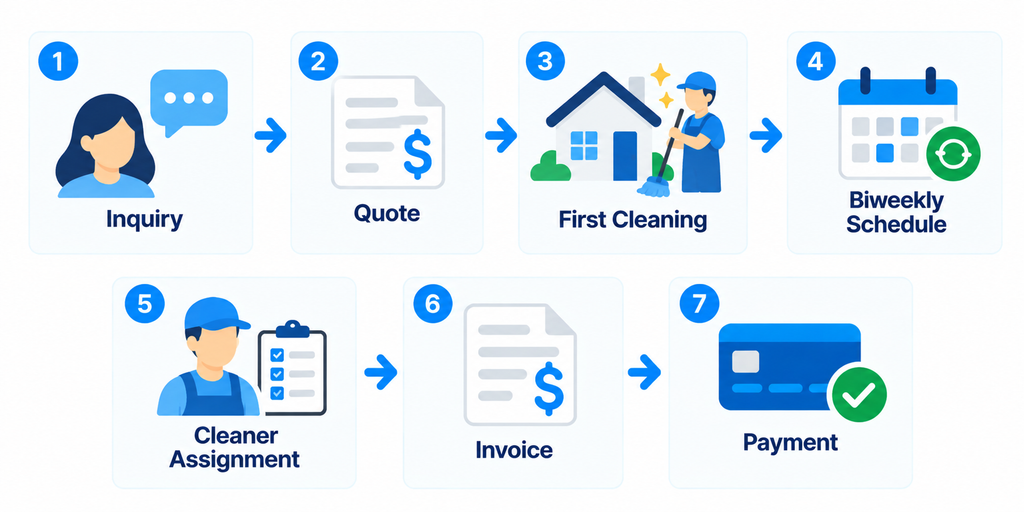
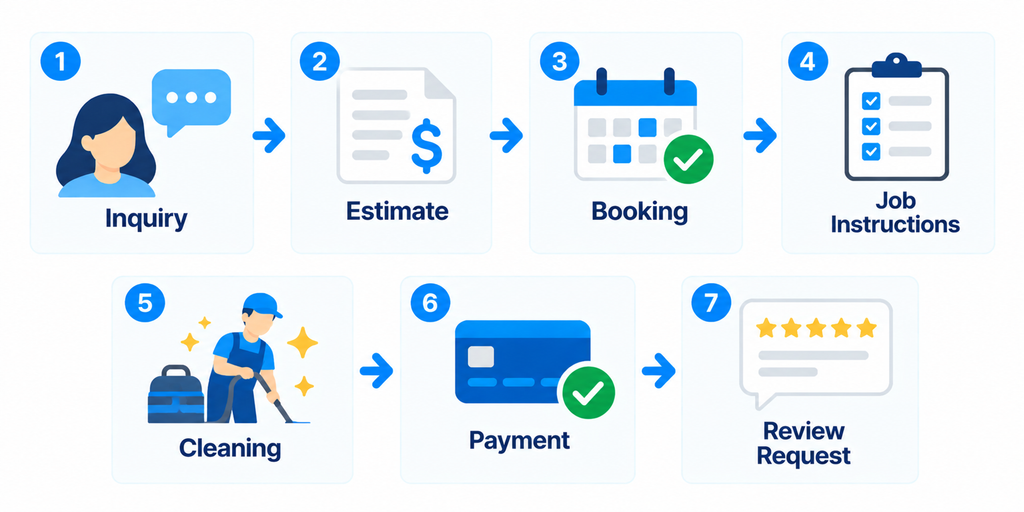
Choose a few representative workflows.
For example:
Residential recurring customer
One-time deep cleaning
Commercial prospect
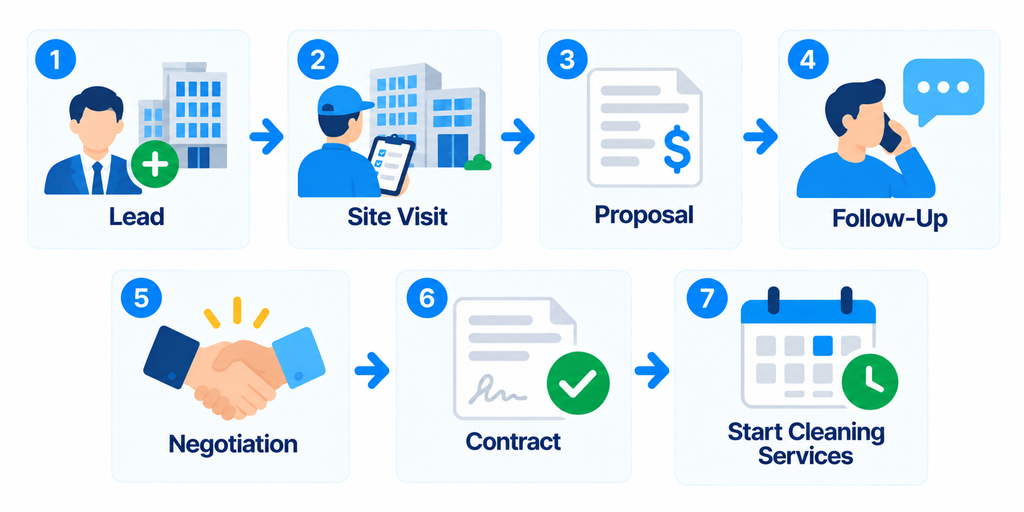
Run those workflows through the software you are considering.
The best platform is usually the one that handles your most common workflow with the fewest unnecessary steps.
Final Take
Jobber is a strong all-in-one option for cleaning businesses, but it is not the only way to manage customers, schedules, jobs, quotes, invoices, and payments.
Housecall Pro offers another broad field-service approach.
ZenMaid and MaidCentral provide workflows designed more specifically around residential cleaning businesses.
BookingKoala is worth considering when online booking is central to your sales process.
ServiceM8 and Workiz provide additional field-service options for teams that need job management and scheduling.
HubSpot takes a different approach and may fit cleaning companies that care more about lead and sales management than field operations.
The goal is not to find software with the longest feature list.
Identify the workflow that is creating the most administrative work in your business, test how each platform handles it, and choose the system that makes that workflow simpler.
If Jobber remains one of your finalists, read our Jobber Review: Is It Worth It for Cleaning Businesses? before making your decision.