
ZenMaid is scheduling and management software built specifically for maid and residential cleaning businesses.
That makes it different from broader field service platforms such as Jobber and Housecall Pro.
Instead of trying to serve every type of home service company, ZenMaid focuses heavily on the everyday workflows of cleaning companies: recurring appointments, cleaner scheduling, customer reminders, booking, payroll, and team coordination.
But specialization does not automatically make it the right software for every cleaning business.
This ZenMaid review looks at its scheduling, recurring jobs, automation, online booking, team management, pricing, pros, cons, and who it fits best.
ZenMaid at a Glance
| Category | ZenMaid |
|---|---|
| Best For | Residential cleaning and maid service businesses |
| Starting Price* | $19/month |
| Scheduling | Yes |
| Recurring Jobs | Yes |
| Automated Reminders | Yes |
| Online Booking | Yes |
| Invoicing | Yes |
| Online Payments | Yes |
| Cleaner Mobile App | Yes |
| Payroll Tools | Available |
| GPS Tracking | Available on higher plans |
| Free Trial | 14 days |
*Pricing and included features can change. SMS charges are not included in the advertised subscription prices.
The biggest difference between ZenMaid and many general field service platforms is focus.
ZenMaid is designed around cleaning-company operations rather than adapting a generic service-business workflow to cleaning.
What Is ZenMaid?
ZenMaid is software designed specifically for maid service and residential cleaning companies.
Its core workflow centers on appointments.
A typical cleaning business might use it like this:
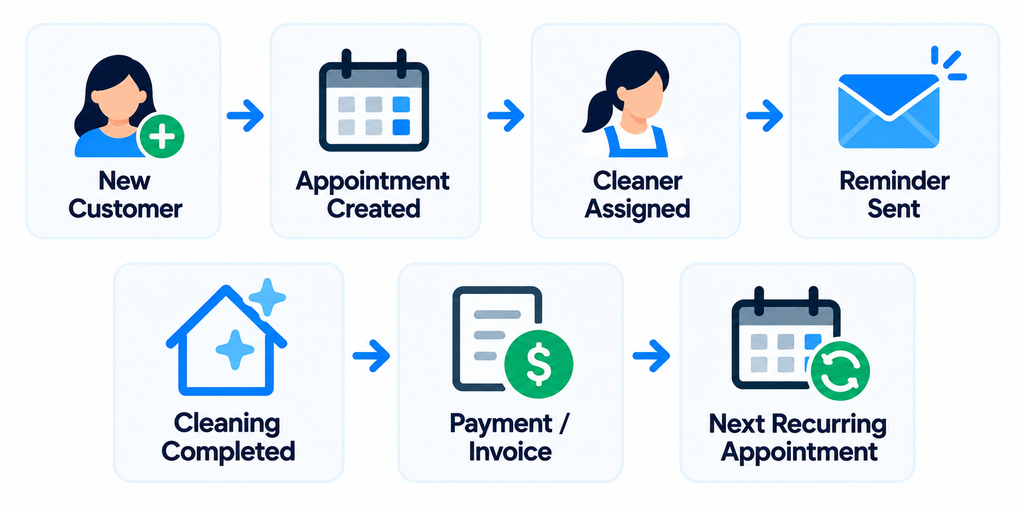
The platform includes tools for scheduling, recurring services, customer records, cleaner communication, online booking, payments, invoicing, and automation.
Higher plans add capabilities such as digital checklists, GPS tracking, reports, payroll, Spot Finder, and more advanced communication tools.
That narrow focus is important.
A plumber, HVAC contractor, and cleaning company may all need scheduling software, but their daily workflows are not identical.
ZenMaid is built around the cleaning workflow.
1. Scheduling
Scheduling is the center of ZenMaid.
Appointments can be created from different scheduling views or directly from a customer’s profile.
For each appointment, you can define details such as:
- Customer
- Service type
- Date
- Start and end time
- Frequency
- Address
- Assigned cleaners
- Notes
- Work items
- Pricing
ZenMaid provides several ways to view and manage the schedule, including calendar and dispatch-oriented views.
Appointments can also be filtered by cleaner, team, status, recurrence, and payment status.
For a cleaning company coordinating several cleaners, that makes the schedule more than a simple calendar.
It becomes the operational control center.
2. Recurring Cleaning Jobs
Recurring cleaning is one of the areas where ZenMaid’s specialization makes sense.
The platform supports recurring services and provides a dedicated Manage Recurring Service area for maintaining them.
You can adjust information such as:
- Frequency
- Day
- Start and end time
- Assigned cleaner or team
- Service price
- Notes
- Work items
- Checklists
Changes can be applied to future appointments from a selected point in the recurring series.
Individual appointments can also be adjusted without necessarily changing the entire recurring service.
That matters for real cleaning businesses.
A biweekly customer may normally receive service every other Tuesday but occasionally need to move one visit to Wednesday.
Your software needs to handle that without turning the entire recurring schedule into a mess.
ZenMaid also supports monthly recurring services based on patterns such as a specific weekday of the month.
3. Cleaner Scheduling and Dispatch
As the team grows, the question changes from:
“When is the customer scheduled?”
to:
“Who is cleaning this home?”
ZenMaid lets businesses assign cleaners or teams to appointments and view schedules around those assignments.
A basic day might look like:
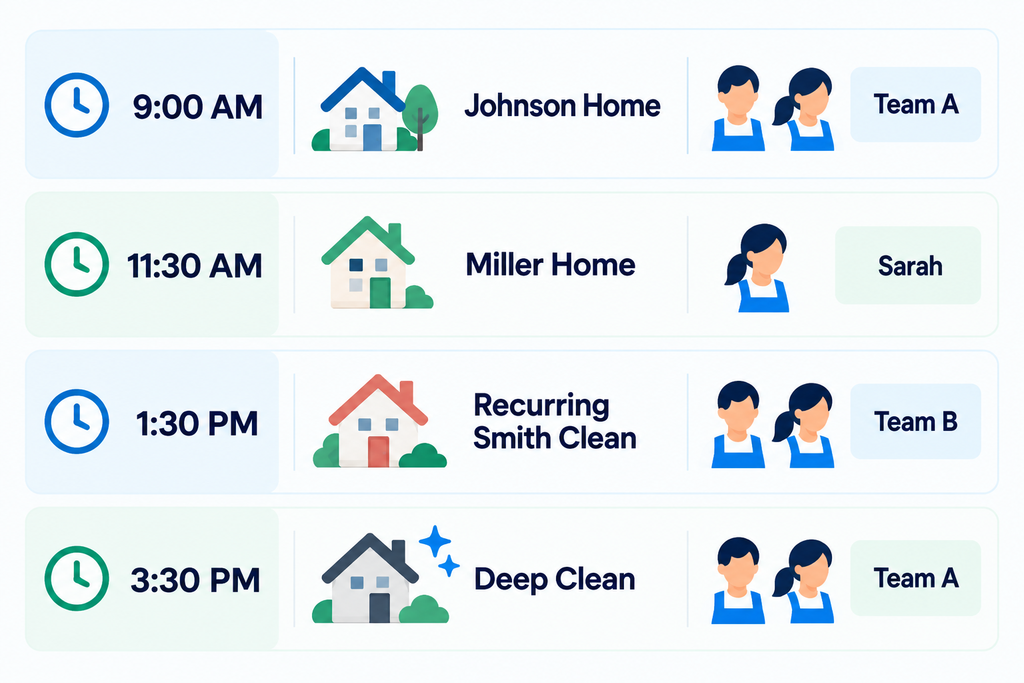
ZenMaid’s Spot Finder can also help locate openings in cleaner schedules for new recurring customers.
It checks forward-looking availability and can identify potential conflicts before the recurring appointment is added.
For a company trying to fit another recurring customer into an already busy schedule, this can be more useful than manually scanning several calendars.
4. Automated Customer and Cleaner Communication
Cleaning businesses spend a surprising amount of time sending repetitive messages.
Examples include:
“Your cleaner will arrive tomorrow.”
“Your appointment has been rescheduled.”
“You have a cleaning scheduled this Friday.”
ZenMaid provides automated email and SMS communication for appointments.
Businesses can configure reminder timing and customize communication templates.
That can reduce repetitive administrative work while keeping customers informed.
Automation is especially useful with recurring customers.
If you have 100 recurring clients, manually reminding every customer before every visit quickly becomes inefficient.
There are limits to the communication system, so businesses with complicated messaging requirements should test the exact automation they need during the trial.
5. Online Booking
ZenMaid provides booking forms that cleaning businesses can add to their websites.
Instead of requiring every prospect to call or send an email, the booking process can move online.
A simplified workflow can look like:
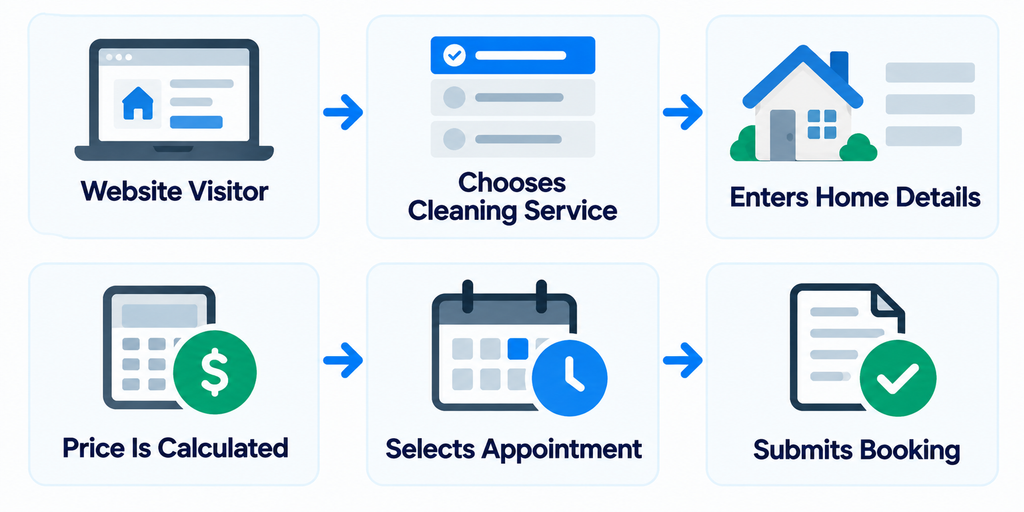
The booking form can be configured with service pricing, extras, minimum booking prices, recurring-cleaning discounts, and sales tax settings.
For a residential cleaning company selling relatively standardized services, this can shorten the path from website visitor to booked customer.
6. Payments and Invoicing
ZenMaid includes invoicing and supports online payments through Stripe and Square.
Pricing information can also be connected to appointments.
For example:
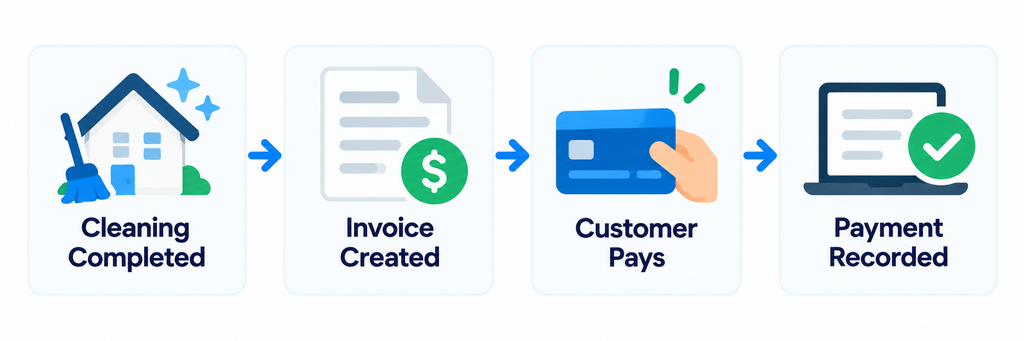
This helps keep scheduling and billing closer together instead of requiring completely separate systems.
There are limitations.
For example, ZenMaid does not currently support combining multiple appointments into a single automated monthly or bulk invoice.
Businesses that bill commercial clients once per month for many completed cleanings should examine this workflow carefully before switching.
7. Cleaner Mobile App
Cleaners do not necessarily need access to the same information as owners or office managers.
ZenMaid provides a mobile app that lets cleaners access information related to their work.
Depending on the plan, businesses can also use features such as GPS tracking and digital checklists.
A cleaner may need to know:
- Where is the next job?
- When does it start?
- What service is required?
- Are there special customer notes?
- What tasks need to be completed?
- What comes next?
Giving cleaners access to the information they need can reduce calls and messages back to the office.
8. Payroll and Reporting
ZenMaid Pro includes payroll and reporting functionality.
For growing cleaning companies, payroll can become another repetitive administrative process.
Connecting appointment information with payroll calculations can reduce manual data entry.
Reports can also help owners understand what is happening across the business rather than relying entirely on spreadsheets.
The usefulness of these features depends on how your company pays cleaners and which reports you actually need.
Test your real payroll structure before assuming the software will replace your current process.
ZenMaid Pricing
ZenMaid currently offers three main plans.
| Plan | Starting Price* | Appointments |
|---|---|---|
| Starter | $19/month | Up to 40/month |
| Pro | $39/month | Unlimited |
| Pro Max | $49/month | Unlimited |
*Published starting prices at the time of writing. SMS charges are separate, and pricing can change.
Starter
Starter is designed for cleaning businesses that are just getting started.
It includes scheduling, limited automated communications, the mobile app, online payments, and invoicing.
The main limitation is the cap of 40 appointments per month.
That can work for a new solo cleaner but becomes restrictive once recurring customers accumulate.
Pro
Pro removes the appointment limit and adds features aimed at established cleaning companies.
These include:
- Digital checklists
- Cleaner GPS tracking
- Booking forms
- More automated communications
- Reports
- Payroll
- Spot Finder
For an established residential cleaning business, Pro is likely the plan that deserves the closest evaluation.
Pro Max
Pro Max is ZenMaid’s most comprehensive standard plan.
It adds further functionality and priority support beyond Pro.
Some newer advanced features, such as automated post-cleaning Service Ratings, require Pro Max.
The important question is not whether Pro Max has more features.
It is whether your business will actually use enough of those additional features to justify the higher subscription.
ZenMaid Pros
1. Built Specifically for Cleaning Businesses
This is ZenMaid’s clearest differentiator.
Its scheduling, recurring-service, cleaner, and booking workflows are designed around maid services rather than general field service businesses.
2. Strong Recurring Scheduling
Recurring customers are fundamental to many residential cleaning businesses.
ZenMaid provides dedicated tools for managing recurring services and adjusting future appointments.
3. Low Starting Price
Starter begins at $19 per month at the time of publication.
That gives small cleaning businesses a relatively inexpensive entry point.
4. Useful Automation
Automated reminders can reduce repetitive customer and cleaner communication.
5. Cleaner-Focused Tools
Cleaner assignments, mobile access, checklists, GPS functionality on higher plans, and payroll tools can become increasingly useful as a team grows.
6. Online Booking
The booking form can help turn website visitors into scheduled customers without requiring every booking to be handled manually.
ZenMaid Cons
1. Starter Has a 40-Appointment Limit
Forty appointments per month can disappear quickly.
For example:
10 biweekly customers ≈ 20 appointments/month
20 biweekly customers ≈ 40 appointments/month
Once you add weekly customers or one-time jobs, a growing company can outgrow Starter relatively quickly.
2. It Is More Specialized Than General Field Service Software
Specialization is a strength, but it can also be a limitation.
A business offering cleaning plus several unrelated home services may prefer a broader field service platform.
3. Some Features Require Higher Plans
GPS tracking, reports, payroll, expanded automation, and other capabilities are not all available on Starter.
Compare plans based on the features you actually need.
4. Calendar Integrations Are Limited
ZenMaid does not offer full two-way synchronization with external calendars such as Google Calendar or Apple Calendar.
Businesses that rely heavily on an external calendar should test this limitation carefully.
5. Bulk Monthly Invoicing Is Limited
ZenMaid does not currently support automatically combining multiple appointments into one monthly invoice.
That may matter more for commercial cleaning companies than residential maid services.
Who Is ZenMaid Best For?
New Solo Cleaner
Starter can be attractive for a new cleaning business that wants to move beyond paper, spreadsheets, or a basic calendar.
The $19 starting price keeps the initial software cost relatively low.
But watch the 40-appointment monthly limit.
Established Residential Cleaning Business
This is where ZenMaid may fit particularly well.
A company with recurring customers and several cleaners can benefit from:
- Recurring scheduling
- Cleaner assignments
- Automated reminders
- Booking forms
- Digital checklists
- Payroll
- Reporting
The Pro plan is the natural place to evaluate these workflows.
Growing Multi-Cleaner Company
As the number of cleaners increases, scheduling conflicts and team communication become harder to manage manually.
Features such as Spot Finder, GPS tracking, mobile access, and cleaner scheduling can become more valuable.
Commercial Cleaning Company
ZenMaid can still manage cleaning appointments, but commercial businesses should test their billing and operational requirements carefully.
If your company relies heavily on complex proposals, monthly consolidated invoices, or broader field-service workflows, another platform may fit better.
ZenMaid vs Jobber vs Housecall Pro
All three platforms can help a cleaning business manage operations, but their emphasis differs.
| Platform | Main Strength |
|---|---|
| ZenMaid | Cleaning-specific scheduling and recurring-service workflows |
| Jobber | Broad customer-to-payment field service workflow |
| Housecall Pro | Dispatching and field-team operations |
ZenMaid deserves particular attention if residential cleaning is the core of your business.
Jobber and Housecall Pro are broader platforms designed for multiple home-service industries.
That does not automatically make ZenMaid better.
It means the decision should depend on whether you value cleaning-specific workflows or a broader field-service platform.
For a deeper comparison of alternatives, see our Best Cleaning Business Software: 7 Tools Compared.
You can also read our Jobber Review and Housecall Pro Review.
How to Test ZenMaid Before Paying
ZenMaid offers a 14-day free trial.
Use the trial to recreate a real week of your cleaning business.
- Add several customers.
- Create a one-time cleaning.
- Create a recurring customer.
- Assign cleaners.
- Move one recurring appointment.
- Add customer and cleaner notes.
- Configure an appointment reminder.
- Test the booking form.
- Complete a job from the cleaner workflow.
- Create an invoice.
- Test a payment.
- Review your schedule for the following week.
Then ask:
Could our office staff use this every day?
Could a new cleaner understand their schedule?
Does recurring scheduling save us time?
Would the automation replace manual messages?
Does the billing workflow fit how we charge customers?
Would we actually use the higher-plan features?
If the answer to those questions is yes, the subscription is much easier to justify.
Final Take
ZenMaid stands out because it is built specifically around maid service and residential cleaning workflows.
Its strongest areas are scheduling, recurring services, cleaner coordination, automated communication, and online booking.
The $19 Starter plan gives newer cleaning businesses a relatively inexpensive entry point, although its 40-appointment monthly limit means growing businesses may need to move to Pro.
For established residential cleaning companies, Pro’s unlimited appointments, checklists, GPS tracking, booking forms, payroll, reporting, and Spot Finder make it the more important plan to evaluate.
ZenMaid is less compelling if your business needs a broad field-service platform for several different service industries or relies heavily on workflows such as consolidated monthly invoicing.
Use the 14-day trial to recreate your actual recurring schedule before deciding.
If you want to compare ZenMaid with broader alternatives, start with our Best Cleaning Business Software and Best CRM for Cleaning Businesses.