
ZenMaid and Jobber can both help cleaning businesses manage customers, schedules, recurring jobs, teams, and payments.
But they approach the problem from different directions.
ZenMaid is built specifically around maid service and residential cleaning workflows.
Jobber is a broader field service platform used across cleaning and many other home service industries.
That difference affects everything from scheduling and recurring services to invoicing, automation, team management, and pricing.
This ZenMaid vs Jobber comparison breaks down the key differences so you can decide which workflow better matches your cleaning business.
ZenMaid vs Jobber at a Glance
| Category | ZenMaid | Jobber |
|---|---|---|
| Main Focus | Maid and cleaning businesses | Field service businesses |
| Starting Price* | $19/month | $29/month with annual billing |
| Recurring Jobs | Yes | Yes |
| Scheduling | Yes | Yes |
| Cleaner / Team Assignment | Yes | Yes |
| Online Booking | Yes | Yes |
| Invoicing | Yes | Yes |
| Online Payments | Yes | Yes |
| Cleaning-Specific Workflow | Strong | General field service |
| Free Trial | 14 days | 14 days |
*Published starting prices at the time of writing. Prices and included features can change.
The biggest difference is not whether the platforms can schedule cleaning jobs.
Both can.
The bigger question is whether you want software designed specifically around cleaning operations or a broader system that manages the full field-service workflow.
What Is ZenMaid?
ZenMaid is software built specifically for maid service and residential cleaning companies.
Its workflow centers heavily on appointments, recurring customers, cleaner assignments, communication, and day-to-day cleaning operations.
A typical ZenMaid workflow might look like:
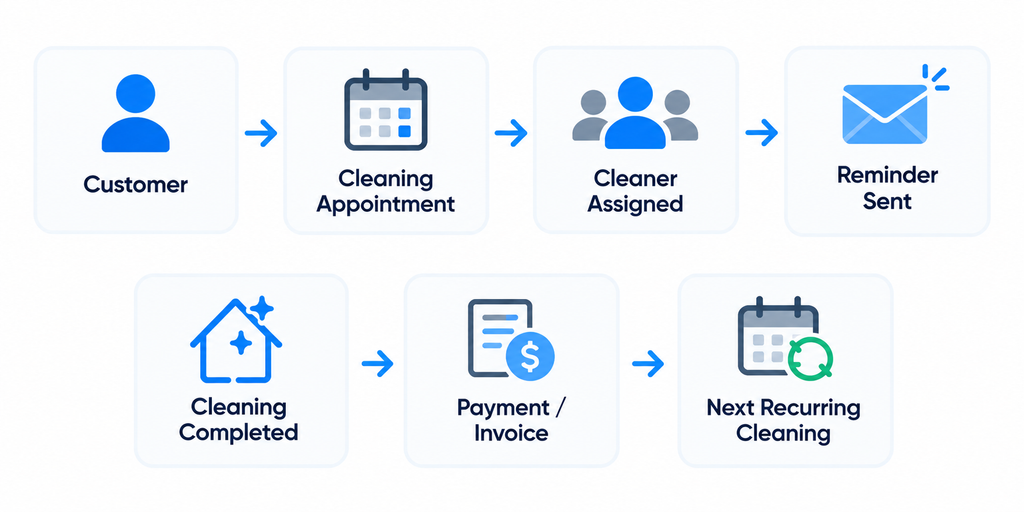
That cleaning-specific approach is ZenMaid’s clearest differentiator.
What Is Jobber?
Jobber is a field service management platform used by cleaning companies and many other service businesses.
Its workflow is broader than ZenMaid’s and can cover the customer journey from an initial request through quoting, scheduling, job completion, invoicing, and payment.
A simplified Jobber workflow might look like:
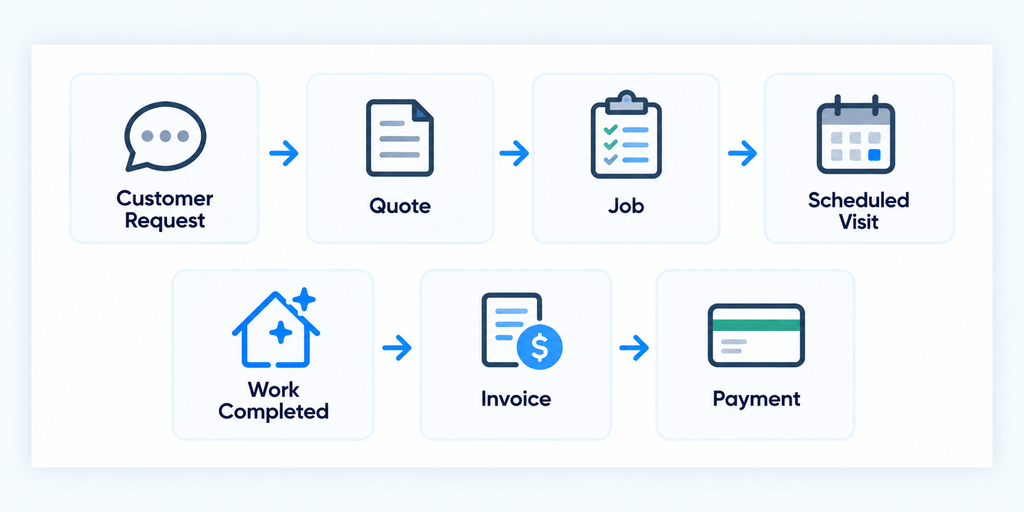
For cleaning businesses that want a broader customer-to-payment system, that structure can be attractive.
1. Pricing
ZenMaid has the lower published starting price.
ZenMaid Pricing
| Plan | Starting Price* |
|---|---|
| Starter | $19/month |
| Pro | $39/month |
| Pro Max | $49/month |
Starter is aimed at newer businesses and is limited to 40 appointments per month.
Pro removes that appointment limit and adds features such as digital checklists, cleaner GPS tracking, booking forms, expanded automated communication, reports, payroll, and Spot Finder.
Pro Max adds additional functionality and priority support.
Jobber Pricing
| Plan | Starting Price* |
|---|---|
| Core | $29/month |
| Connect | $99/month |
| Grow | $149/month |
| Plus | $399/month |
*Jobber prices above reflect published starting prices with annual billing at the time of writing. Pricing varies by plan, billing cycle, and team size.
ZenMaid therefore has a much lower entry price on the published plans.
But price alone is not enough to compare the platforms because Jobber’s higher plans include broader field-service, sales, customer-management, and profitability tools.
2. Scheduling
Scheduling is central to both platforms.
ZenMaid allows cleaning businesses to create appointments, assign cleaners, define frequency, add customer and appointment notes, add work items, and manage pricing from the appointment workflow.
Its calendar and dispatch views can also be filtered by cleaner, team, status, recurrence, and payment status.
Jobber uses jobs and visits.
A job represents the overall work or contract, while visits represent the individual times your team goes to the customer’s property.
That structure can be useful when a business needs to connect scheduling with quoting, job tracking, billing, and other parts of the customer workflow.
3. Recurring Cleaning Jobs
Recurring cleaning is important enough that this category deserves special attention.
ZenMaid has dedicated recurring-service management built around cleaning appointments.
You can adjust frequency, timing, cleaner assignments, pricing, notes, and future appointments within a recurring service.
You can also modify an individual cleaning without necessarily changing the entire recurring series.
Jobber also supports recurring jobs.
A recurring job can contain repeating visits, assigned team members, and a billing schedule.
Jobber can invoice recurring work per visit or using a fixed price, with billing schedules such as after each visit, monthly, or on a custom schedule.
The distinction is mainly one of structure.
ZenMaid approaches recurrence from a cleaning-service perspective, while Jobber connects recurring work more deeply with its broader job and billing system.
4. Customer Management
Both platforms store customer information, but Jobber puts more emphasis on the broader customer lifecycle.
Jobber’s client manager can store customer and property information, while Client Hub gives customers a self-service area where they can review appointments, approve quotes, and pay invoices.
ZenMaid’s customer records are closely tied to appointments and recurring cleaning services.
For a residential cleaning company that primarily needs to know who the customer is, where the cleaning takes place, what notes apply, and when the next service occurs, that narrower structure may be enough.
5. Quotes and Online Booking
The platforms also differ in how they approach new business.
ZenMaid offers booking forms designed around cleaning services.
Booking inquiries can be converted into one-time appointments, recurring subscriptions, or leads depending on how the customer completes the form.
Jobber supports online booking as well, but it also places significant emphasis on requests and quotes as part of its broader workflow.
That can matter for businesses where many jobs require a custom quote before scheduling.
6. Invoicing and Payments
Both platforms support invoicing and online payments.
ZenMaid can connect with Stripe or Square for card processing and allows businesses to send invoices with online payment options.
Jobber’s invoicing is more tightly connected to its job workflow.
For recurring jobs, businesses can choose whether to invoice per visit or at a fixed price and determine when invoice reminders should be generated.
On eligible plans, Jobber Payments can also automatically create invoices and charge a customer’s saved payment method for recurring work.
For businesses with more complicated billing requirements, this broader billing structure may be important.
7. Team Management
Both platforms can help businesses coordinate multiple cleaners.
ZenMaid focuses on cleaner assignments, schedules, mobile access, digital checklists, GPS tracking on qualifying plans, payroll tools, and cleaning-specific operational information.
Jobber allows team members to be assigned to jobs and visits and provides mobile access to the information they need in the field.
Jobber also supports team permissions, time tracking on qualifying plans, and broader job-management workflows.
8. Automation
Automation can reduce repetitive office work as a cleaning business grows.
ZenMaid includes automated email and SMS communication for customers and cleaners, with the available automation increasing on higher plans.
Jobber can automate customer reminders and other workflow steps, while higher plans provide additional automation capabilities.
The important question is not simply which platform lists more automation features.
It is whether those automations match the repetitive tasks your office currently performs manually.
Which Fits Different Cleaning Businesses?
Solo Residential Cleaner
ZenMaid’s lower starting price and cleaning-specific workflow make it worth evaluating first if your main needs are scheduling, recurring customers, reminders, and basic billing.
Small Residential Cleaning Team
Both platforms are relevant. ZenMaid emphasizes cleaner scheduling and recurring maid-service operations, while Jobber provides a broader customer, quoting, job, and billing workflow.
Growing Multi-Cleaner Business
Compare the exact operational bottleneck. ZenMaid offers cleaning-focused tools such as Spot Finder, payroll, checklists, and cleaner GPS on qualifying plans. Jobber adds broader workflow, billing, customer-management, and profitability tools as you move through its plans.
Cleaning Company Offering Multiple Service Types
Jobber may deserve closer evaluation when cleaning is only one part of a broader home-service operation because the platform is designed for field service businesses across multiple industries.
ZenMaid vs Jobber Feature Comparison
| Feature | ZenMaid | Jobber |
|---|---|---|
| Cleaning-Specific Design | Yes | No |
| Scheduling | Yes | Yes |
| Recurring Services | Yes | Yes |
| Cleaner / Team Assignment | Yes | Yes |
| Online Booking | Yes | Yes |
| Customer Records | Yes | Yes |
| Quotes | More limited focus | Core workflow feature |
| Invoicing | Yes | Yes |
| Online Payments | Yes | Yes |
| Automated Reminders | Yes | Yes |
| Digital Checklists | Available on Pro+ | Available |
| GPS / Field Tracking | Available on higher plans | Available depending on plan/features |
| Payroll Tools | Available on Pro+ | Time and job-costing tools available depending on plan |
| Job Costing | Not a primary focus | Available on Grow and Plus |
Where ZenMaid Stands Out
- Built specifically for maid and residential cleaning businesses
- Strong recurring-cleaning workflow
- Lower published starting price
- Cleaning-focused scheduling and cleaner management
- Spot Finder for recurring-customer scheduling on Pro
- Payroll and digital checklists available on Pro and above
Where Jobber Stands Out
- Broader request-to-payment workflow
- Strong quoting and customer-management tools
- Flexible recurring-job billing
- Integrated invoicing and automatic payment options
- Client Hub for customer self-service
- Job costing and broader operational tools on higher plans
Neither list automatically makes one platform better for every cleaning company.
The more useful question is which set of strengths matches the way your company actually operates.
How to Test ZenMaid and Jobber
Both platforms offer a 14-day free trial.
If you are seriously comparing them, recreate the same workflow in both systems.
- Add five real customer profiles.
- Create a one-time cleaning.
- Create a weekly recurring customer.
- Create a biweekly recurring customer.
- Assign multiple cleaners.
- Move one appointment without changing the entire recurring series.
- Add customer and job notes.
- Configure an appointment reminder.
- Create or test an online booking.
- Complete a cleaning from the field workflow.
- Create an invoice.
- Test the payment process.
- Check how the next week appears on the schedule.
- Test the workflow from a cleaner’s perspective.
- Write down every manual workaround you needed.
Then compare the results.
- Which schedule was easier to understand?
- Which handled recurring customers more naturally?
- Which required fewer manual steps?
- Which would be easier for a new cleaner to learn?
- Which billing workflow matches how you charge customers?
- Which features would you actually use every week?
- What would each platform cost at your current team size?
A real workflow test is more useful than comparing feature lists alone.
Final Take
ZenMaid and Jobber can both manage core cleaning-business workflows, but they are built from different starting points.
ZenMaid focuses specifically on maid and residential cleaning companies. Its strengths include recurring-cleaning management, cleaner scheduling, cleaning-specific automation, and a relatively low starting price.
Jobber is a broader field service platform. Its strengths include customer management, quoting, scheduling, recurring jobs, invoicing, payments, and a more extensive customer-to-payment workflow.
A residential cleaning company primarily trying to organize recurring customers and cleaners may find ZenMaid’s specialized approach attractive.
A cleaning company that wants a broader system for managing requests, quotes, jobs, billing, customers, and field operations may find Jobber’s structure more suitable.
Use both free trials with the same customers, recurring schedules, cleaners, and billing scenarios before deciding.
For a deeper look at each platform, read our ZenMaid Review and Jobber Review.
You can also compare more options in our Best Cleaning Business Software, Best CRM for Cleaning Businesses, and Best Jobber Alternatives.