
Scheduling cleaning jobs becomes more challenging as your business grows. Recurring appointments, multiple cleaners, cancellations, and last-minute changes can quickly make a basic calendar difficult to manage.
This guide shows you how to organize cleaning appointments, assign crews, manage recurring clients, and reduce scheduling conflicts—so your team can work more efficiently.
The Basic Cleaning Business Scheduling Workflow
A simple scheduling process should move every new cleaning job through the same basic steps.
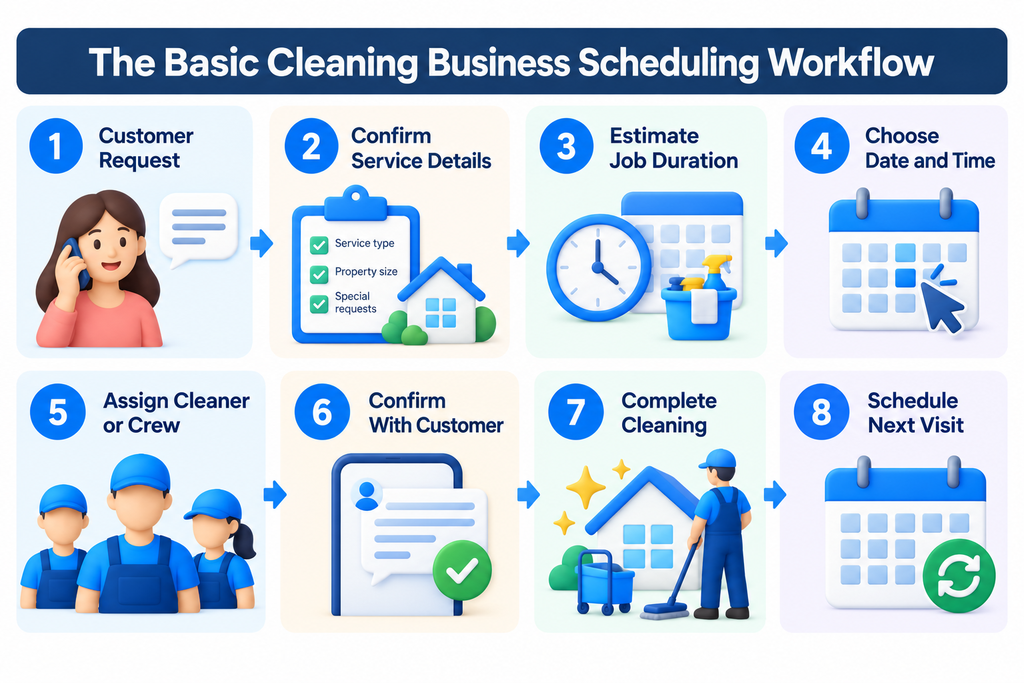
Consistency is key. Before each job, confirm the service details, estimated duration, scheduled time, assigned crew, and customer notification. For recurring clients, schedule the next visit before closing out the current job.
1. Separate One-Time and Recurring Cleaning Jobs
Start by separating one-time cleaning jobs from recurring appointments. They require different scheduling approaches.
One-Time Cleaning Jobs
One-time jobs, such as deep cleaning, move-out cleaning, and post-construction cleaning, should fill available time slots without disrupting recurring appointments.
Recurring Cleaning Jobs
Recurring jobs follow a regular schedule, such as weekly, biweekly, or monthly visits. Reserve these appointments first to create a predictable calendar, then schedule one-time jobs around them.
If recurring appointments become difficult to manage manually, see our guide to the best scheduling software for cleaning businesses.
2. Estimate How Long Each Cleaning Job Will Take
Accurate job duration estimates help prevent delays, scheduling conflicts, and unnecessary gaps between appointments.
Estimate cleaning time based on these factors:
- Property size
- Number of bedrooms and bathrooms
- Type of cleaning service
- Condition of the property
- Number of cleaners assigned
- Special requests or add-ons
- Property access and setup time
Add travel time between appointments separately when building your daily schedule. Compare estimated and actual cleaning times after each job to improve future estimates.
3. Build the Schedule Around Recurring Customers
Use recurring appointments as fixed blocks in your weekly calendar. Then identify the remaining time slots available for one-time jobs, new customers, and rescheduled visits.
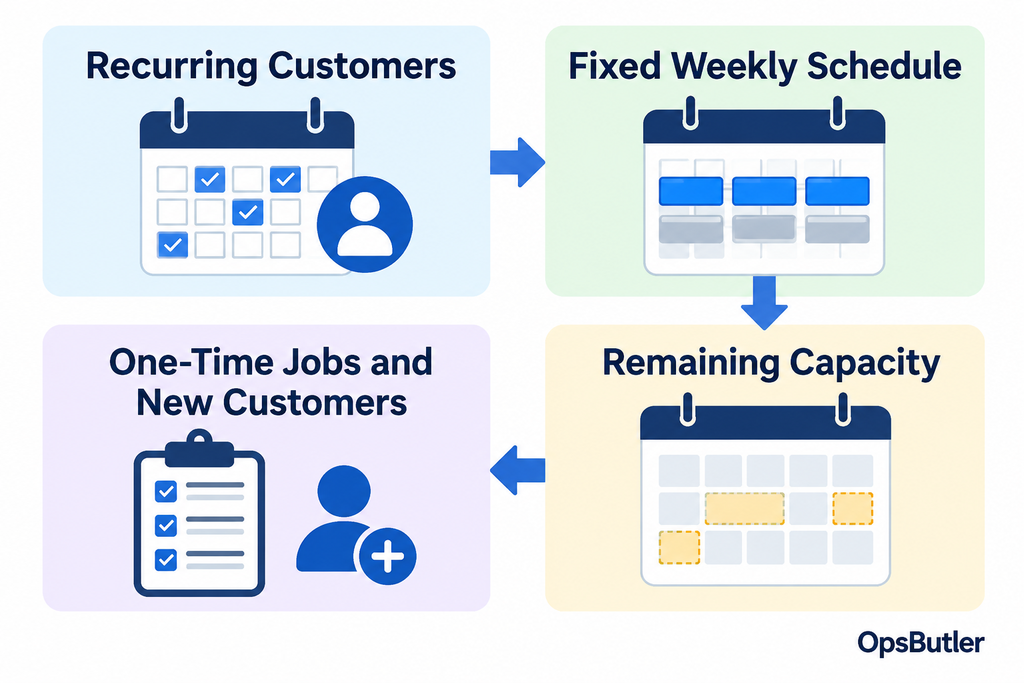
Review available capacity before accepting new bookings. Check not only whether a time slot is open, but also whether the assigned crew can complete the job without conflicting with existing commitments.
4. Assign the Right Cleaner or Crew
Assign cleaners based on availability, location, skills, and existing customer relationships. Before confirming a job, consider:
- Cleaner availability
- Job location
- Expected job duration
- Required skills or experience
- Existing customer-cleaner relationships
- Travel time from the previous job
For recurring customers, assign the same cleaner or crew whenever possible. Familiarity with the property and customer preferences can improve consistency and reduce unnecessary handovers.
5. Include Travel Time Between Cleaning Jobs
Travel time is an essential part of a realistic cleaning schedule. Allow enough time between appointments for packing equipment, driving, parking, and preparing for the next job.
Example
Cleaning ends: 11:00 a.m.
Travel time: 25 minutes
Buffer: 15 minutes
Next realistic start time: 11:40 a.m.
Include travel and buffer time when assigning appointments to prevent overlapping schedules and avoidable delays.
6. Group Cleaning Jobs by Location
Group cleaning appointments by neighborhood or ZIP code to reduce unnecessary driving and increase productive cleaning hours.
When possible, schedule nearby customers on the same day or within the same time window. As your team grows, organizing jobs by location can help reduce travel costs and improve daily scheduling efficiency.
7. Leave Buffer Time for Delays
Even a well-planned cleaning schedule needs flexibility. Unexpected delays, difficult properties, customer access issues, and jobs that take longer than estimated can disrupt the rest of the day.
Leave a reasonable buffer between appointments based on your job types and scheduling history. This helps absorb unexpected delays without pushing every subsequent booking behind schedule.
8. Create a Process for Cancellations and Rescheduling
Establish clear rules for cancellations and rescheduling before problems arise. Your process should address:
- How much notice should customers provide?
- What happens when a recurring customer skips a visit?
- Who updates the cleaner or crew?
- How are customers notified of a new appointment time?
- Can an open slot be offered to another customer?
Document these rules and communicate changes promptly to both customers and cleaners. This helps prevent missed appointments, confusion, and unused scheduling capacity.
9. Confirm Cleaning Appointments With Customers
Confirm each cleaning appointment with the customer to prevent missed visits, arrival-time confusion, and service misunderstandings.
Every confirmation should include:
- Appointment date
- Expected arrival time or arrival window
- Service being performed
- Property address
- Access instructions, if needed
- Contact information for schedule changes
As your business grows, automated appointment reminders can reduce manual communication and help keep customers informed.
When Spreadsheets Stop Being Enough
Spreadsheets can work well for small cleaning businesses, but they become harder to manage as appointments, crews, and schedule changes increase.
You may be ready for scheduling software when:
- You manage multiple cleaners or crews.
- Recurring appointments are difficult to track.
- Cancellations and rescheduling happen frequently.
- Cleaners need mobile access to their schedules.
- Manual reminders and job assignments take too much time.
The goal is not to buy expensive software, but to reduce scheduling errors and administrative work.
For a comparison of tools such as Jobber, ZenMaid, and Housecall Pro, see our best scheduling software for cleaning businesses.
Cleaning Business Scheduling Software to Consider
Scheduling software can help cleaning businesses manage recurring appointments, crew assignments, and schedule changes. Three options worth considering are:
Jobber
A strong option for businesses that want scheduling alongside customer management, quotes, invoicing, and payments.
Read our Jobber review.
ZenMaid
Designed for residential maid services, with a focus on recurring appointments and cleaner scheduling.
Read our ZenMaid review.
Housecall Pro
A broader field-service platform offering scheduling, dispatching, customer notifications, and business-management tools.
Read our Housecall Pro review.
For a detailed comparison of features and pricing, see our best scheduling software for cleaning businesses.
A Simple Weekly Scheduling Routine
A good scheduling system also needs a routine for maintaining it.
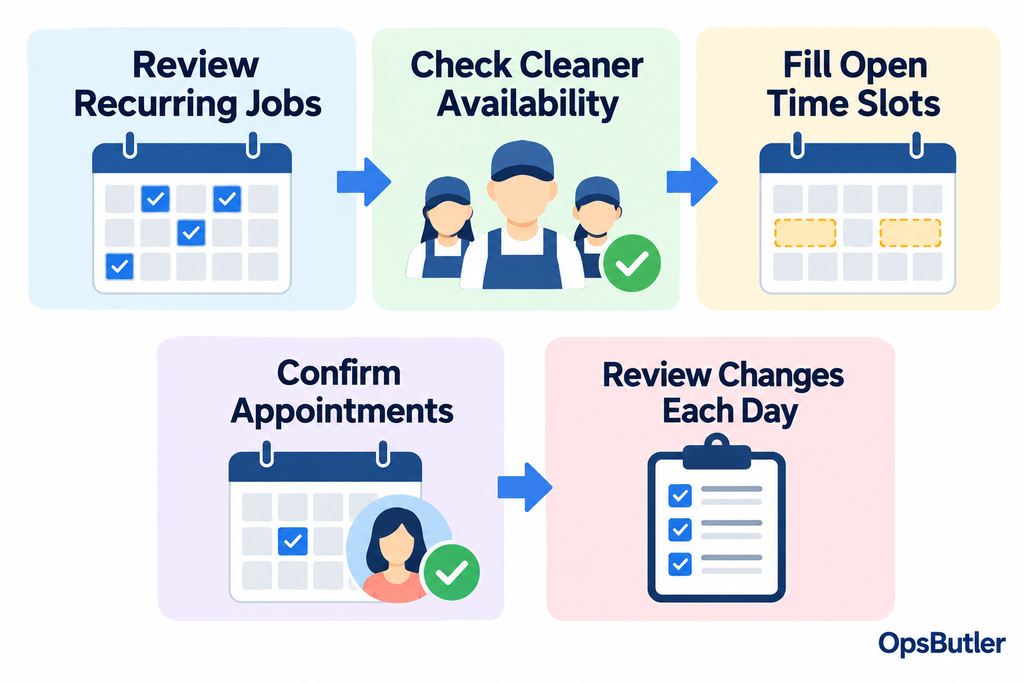
At the start of each week, review recurring appointments and cleaner availability. Fill remaining time slots with new or one-time jobs, then confirm bookings with customers.
Check the schedule daily for cancellations, delays, and staffing changes. A consistent routine helps prevent scheduling conflicts and last-minute confusion.
Final Take
Effective cleaning business scheduling starts with a consistent process: prioritize recurring jobs, estimate realistic cleaning times, assign the right crews, and account for travel and unexpected delays.
As your business grows, scheduling software can reduce manual work, simplify recurring appointments, and help prevent booking conflicts.
Compare the best scheduling software for cleaning businesses to find the right fit for your team and budget.