
Create a professional cleaning quote with a clear service scope, itemized pricing, optional add-ons, and approval terms. Use the example below to see how a completed quote should look.
This guide walks you through preparing accurate quotes, avoiding common pricing mistakes, and turning more estimates into booked cleaning jobs.
Cleaning Business Quote Example
A cleaning quote should show the service details, itemized costs, and total price at a glance. Here is a completed example.
Completed Cleaning Quote Example
| Field | Details |
|---|---|
| Customer | Sarah Johnson |
| Service | Standard House Cleaning |
| Property | 3 bedrooms / 2 bathrooms |
| Frequency | Biweekly |
| Proposed date | October 8, 2026 |
| Estimated duration | 3 hours |
| Quote validity | 14 days |
| Service | Price |
|---|---|
| Standard Cleaning | $160 |
| Inside Oven Cleaning | $25 |
| Total | $185 |
Free Cleaning Quote Template — Copy and Customize
Copy the template below and replace the blank fields with your business and customer details.
CLEANING SERVICE QUOTE
Business: [Business Name]
Contact: [Phone / Email]
Customer: [Customer Name]
Property Address: [Service Address]
Service Type: [Cleaning Service]
Scope of Work: [Included Tasks]
Frequency: [One-Time / Weekly / Biweekly / Monthly]
Proposed Date: [Date]
Estimated Duration: [Hours]
PRICING
Base Cleaning Service: $[Amount]
Optional Add-Ons: $[Amount]
Taxes / Fees (if applicable): $[Amount]
TOTAL: $[Amount]
Payment Terms: [Terms]
Quote Valid Until: [Date]
Approval Instructions: [How to Accept This Quote]
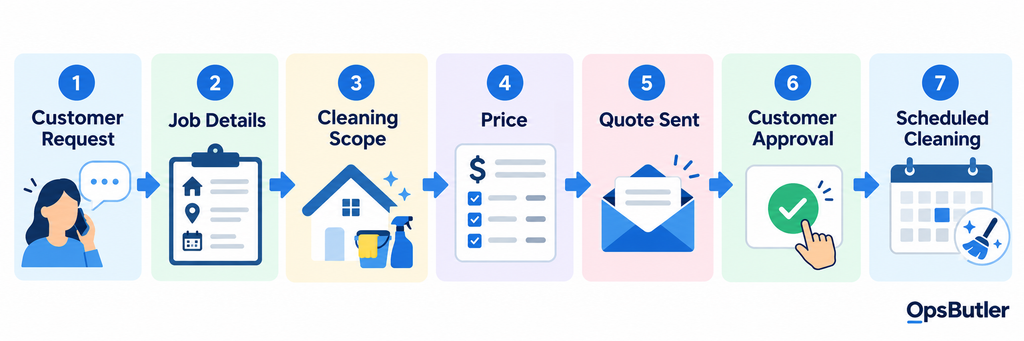
What Should a Cleaning Business Quote Include?
Before sending a cleaning quote, check that it includes the following essential details:
- Business name and contact information
- Customer name and service address
- Type of cleaning service
- Scope of work
- Cleaning frequency
- Price
- Optional services or add-ons
- Proposed service date or schedule
- Payment terms
- Quote expiration date
- Clear next step for approval
For commercial or specialized cleaning jobs, include any additional service specifications, exclusions, or terms that affect the scope and price.
1. Start With the Customer and Property Details
Start with the customer’s contact details and service address, then collect the property information needed to prepare an accurate quote.
- Residential cleaning: Bedrooms, bathrooms, approximate square footage, pets, and access instructions.
- Commercial cleaning: Facility size, operating hours, cleaning frequency, access requirements, and areas to be serviced.
Keep these details with the quote so your team can move smoothly from customer approval to scheduling.
2. Define the Cleaning Scope Clearly
Clearly define what is included in the quoted price. For example, instead of listing only “House Cleaning — $180,” specify the tasks covered by your standard cleaning service.
Standard Cleaning
- Kitchen surfaces
- Exterior of appliances
- Bathroom cleaning
- Dusting
- Vacuuming
- Mopping
- Trash removal
Clearly distinguish standard cleaning from deep cleaning, move-out cleaning, and other service levels. Use a detailed house cleaning checklist to keep your service scope consistent across quotes.
3. Show the Price in a Way Customers Can Understand
Make the total quoted price easy to find. Show the base cleaning price, optional add-ons, and final total separately so customers know exactly what they are paying for.
If applicable, clearly state whether taxes, travel fees, or other charges are included in the total.
Need help setting your rates? Use our house cleaning pricing guide and calculator
4. Separate the Base Service From Optional Add-Ons
List optional add-ons separately from the base cleaning service so customers can choose what they need without confusion.
Common add-ons include oven cleaning, refrigerator cleaning, interior windows, laundry, and deep-cleaning upgrades.
For example, here’s how optional services change the final quote:
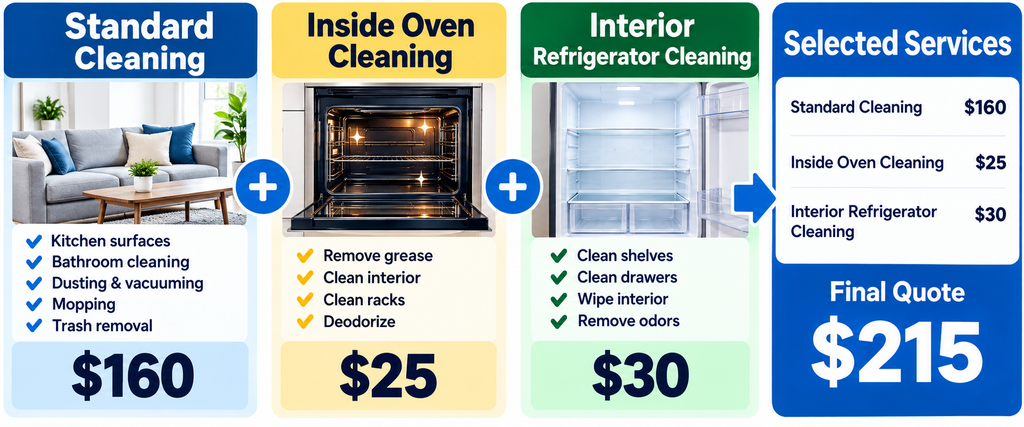
Show each selected add-on and its price in the quote. This makes the final total transparent and lets customers approve exactly which services they want.
5. Set an Expiration Date
Set a clear expiration date for each quote. Pricing, crew availability, and scheduling capacity can change, so customers should know how long your offer remains valid.
For example:
Quote valid for 14 days.
Choose a validity period that fits your business, and apply it consistently across your quotes.
6. Make the Next Step Obvious
Tell customers exactly how to accept the quote and book their cleaning service. Depending on your process, the next step may be:
- Approve the quote online
- Reply to the email
- Sign the quote
- Pay a deposit
- Choose a service date
- Contact the business with questions
Make approval as simple as possible. A clear next step reduces unnecessary back-and-forth before scheduling.
Cleaning business software such as Jobber can let customers review quotes online, approve them, request changes, and pay deposits when enabled. Approved quotes can then be converted into jobs.
Learn more in our Jobber review.
How to Price a Cleaning Quote
Build your quote around the actual cost of the job—not just competitor prices. Account for labor, supplies, travel, overhead, and the profit you want to earn.
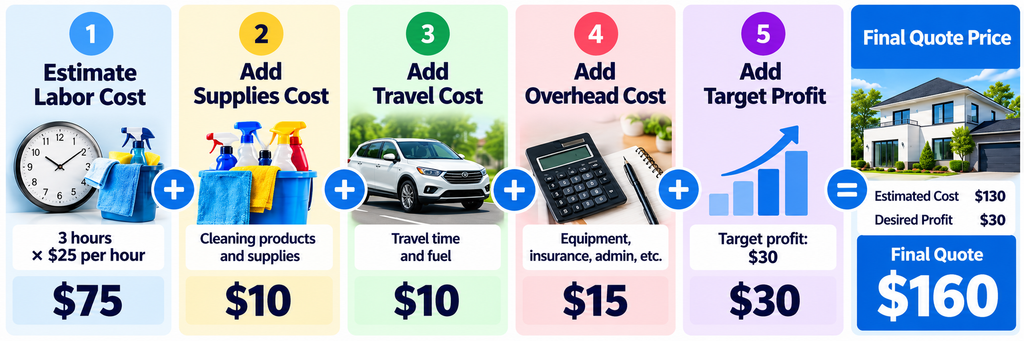
Your quote should cover the full cost of delivering the service while leaving enough profit to sustain your business.
Use our house cleaning pricing guide and calculator to estimate job prices, then check your profitability with the cleaning business profit margin calculator.
Quote vs Estimate: Does the Name Matter?
Cleaning businesses often use “quote” and “estimate” interchangeably, but the distinction can matter. A quote generally communicates a proposed price for a defined scope, while an estimate may be subject to change as job details become clearer.
Whichever term you use, clearly explain the scope of work, pricing assumptions, exclusions, and any conditions that could change the final price. The legal effect of these terms can vary by jurisdiction and the agreement involved.
Need a downloadable document? Use our cleaning business estimate template.
How to Follow Up After Sending a Cleaning Quote
Not every customer approves a cleaning quote immediately. A simple follow-up process helps you answer questions, stay in touch, and move approved quotes into scheduling.
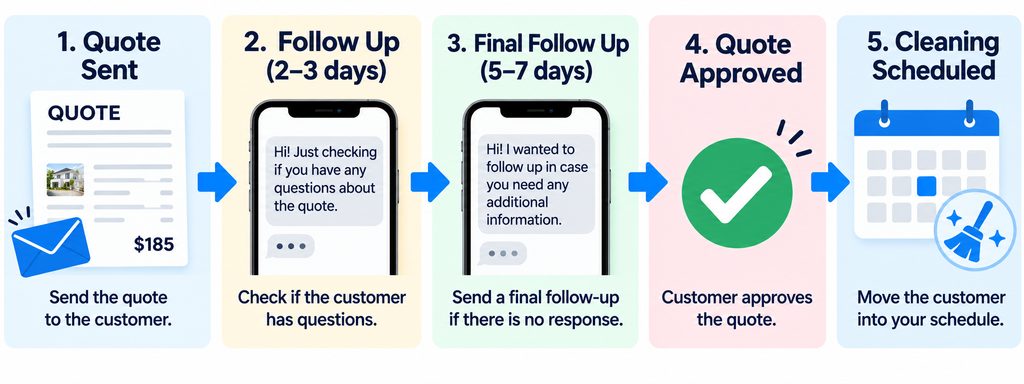
Adjust the follow-up timing to your sales cycle and customer needs. Track unanswered quotes so you know when to follow up, and stop routine reminders once a customer approves or declines.
Track Your Quote Conversion Rate
Track how many cleaning quotes turn into approved jobs to measure the effectiveness of your quoting process.
Quote Conversion Rate = Approved Quotes ÷ Quotes Sent × 100
Example:
20 quotes sent
8 quotes approved
8 ÷ 20 × 100 = 40% quote conversion rate
Don’t rely on the conversion rate alone. Look for patterns that reveal where quotes are being lost:
- Service type: Which cleaning services receive the most approvals?
- Pricing: Are higher-priced quotes rejected more often?
- Follow-up: Are customers going silent after receiving a quote?
- Response time: Are delays causing potential customers to lose interest?
Use these findings to improve your pricing, quote presentation, and follow-up process.
When a Spreadsheet or Document Stops Being Enough
A document or spreadsheet may be enough when you’re sending only a few cleaning quotes. But as your business grows, managing quotes, follow-ups, approvals, and scheduling manually can become difficult.
Consider dedicated quoting software if:
- You create quotes frequently
- Customer information is stored in several places
- You forget to follow up on open quotes
- Multiple employees create quotes
- Customers want online approvals
- Approved quotes must be manually copied into your schedule
- You want quotes, jobs, invoices, and payments connected
The main benefit isn’t just creating professional-looking quotes. It’s connecting customer information, approvals, scheduling, invoicing, and payments in one workflow.
Cleaning Business Software for Quotes and Estimates
If you’re managing multiple quotes, dedicated software can help connect customer approvals with scheduling, invoicing, and payments.
Jobber
Jobber is worth considering if you want to manage cleaning quotes and the jobs that follow in one system.
Customers can review and approve quotes online, while your team can use reusable templates, optional line items, and follow-up tools to manage the quoting process. Approved quotes can then move into job scheduling.
This makes Jobber particularly relevant for cleaning businesses that want to reduce manual work between quoting and booking.
Read our Jobber review, see current Jobber pricing, or compare the best Jobber alternatives.
Housecall Pro
Housecall Pro is another option for cleaning businesses that need estimates connected to their field-service workflow. It supports customer details, line items, and estimate options for presenting different service packages.
Read our Housecall Pro review or compare Jobber vs Housecall Pro.
Compare More Options
If quoting is only one part of what you need, compare the best cleaning business software or the best CRM software for cleaning businesses.
Common Cleaning Quote Mistakes
Even a professional-looking cleaning quote can lose customers if important details are missing. Avoid these common mistakes:
- Unclear scope: Customers don’t know which cleaning tasks are included.
- Hidden extras: Additional fees appear without explanation.
- No expiration date: Old pricing remains valid indefinitely.
- No next step: Customers don’t know how to approve the quote.
- Slow response: Potential customers wait too long to receive a quote.
- No follow-up: Interested customers are forgotten after the quote is sent.
A clear, timely quote with an easy approval process helps prevent these problems.
Final Take
A strong cleaning quote does more than state a price. It clearly defines the work, separates optional add-ons, explains the terms, and makes approval easy.
If you’re just getting started, use our free cleaning business estimate template to create a professional document you can send to customers.
As your quote volume grows, consider the best cleaning business software to connect quoting with customer management, scheduling, invoicing, and payments.