
Getting the cleaning job done is only half the process. You also need a clear, professional way to tell the customer what they owe, what they are paying for, and when payment is due.
A cleaning business invoice helps you do exactly that.
Whether you run a solo house cleaning business or manage multiple cleaning crews, a consistent invoice can make billing easier, reduce confusion, and help you keep better records as your business grows.
In this guide, you’ll find a free cleaning business invoice template you can copy and customize, plus practical examples for residential, deep cleaning, and recurring cleaning jobs.
What Is a Cleaning Business Invoice?
A cleaning business invoice is a document sent to a customer after cleaning services have been completed.
It records the work performed, the amount charged, and the payment details for the job.
A professional invoice also gives both you and your customer a clear record of the transaction.
For cleaning businesses, an invoice may cover:
- Standard house cleaning
- Deep cleaning
- Move-in or move-out cleaning
- Recurring weekly or biweekly cleaning
- Commercial cleaning
- Add-on services
- Cleaning supplies or other approved charges
The exact format can vary, but the goal is always the same: make it immediately clear what the customer is being charged for and how much they need to pay.
What to Include on a Cleaning Business Invoice
A simple cleaning invoice should usually include the following information.
Your Business Information
Include:
- Business name
- Business address
- Phone number
- Email address
- Website, if applicable
If you use a business logo, you can also place it near the top of the invoice.
Customer Information
Include the name of the person or company responsible for payment.
For cleaning businesses, it can also be useful to show the service address separately because the billing address and cleaning location may not always be the same.
Invoice Number
Give every invoice a unique number.
For example:
INV-001
INV-002
INV-003
A consistent numbering system makes invoices easier to track as your business grows.
Invoice Date and Service Date
The invoice date tells the customer when the invoice was issued.
The service date shows when the cleaning actually took place.
For recurring customers, you may instead show the billing period or list multiple service dates.
Cleaning Services
Itemize the services the customer is paying for.
Instead of writing:
Cleaning — $275
you could show:
Standard cleaning — $200
Inside oven — $40
Inside refrigerator — $35
Itemization makes it easier for the customer to understand the final bill.
Subtotal, Tax, and Total
Show the subtotal before any applicable taxes, discounts, or other adjustments.
Then clearly display the final amount due.
Tax treatment varies by location and business circumstances, so confirm the rules that apply to your business rather than automatically adding tax to every invoice.
Payment Due Date
Tell the customer exactly when payment is expected.
Depending on your business model, this might be:
- Due upon receipt
- Due on completion
- Net 7
- Net 15
- Net 30
Accepted Payment Methods
Make it easy for the customer to understand how they can pay.
For example:
- Credit or debit card
- Bank transfer
- Check
- Cash
- Online payment link
The options you offer will depend on your payment system.
Free Cleaning Business Invoice Template
Download the Free Cleaning Business Invoice Template
Use the free OpsButler Excel invoice template to create professional cleaning invoices. Enter your services, quantities, and rates, and the template automatically calculates line-item amounts, subtotal, and total due.
File format: Excel (.xlsx). You can also upload the file to Google Sheets to edit it online.
Here is a simple template you can copy into Word, Google Docs, Excel, Google Sheets, or your invoicing system.
CLEANING SERVICE INVOICE
[YOUR CLEANING BUSINESS NAME]
Address: [Business Address]
Phone: [Phone Number]
Email: [Email Address]
Website: [Website]
INVOICE
Invoice #: [INV-001]
Invoice Date: [MM/DD/YYYY]
Payment Due: [MM/DD/YYYY]
BILL TO
Customer: [Customer Name]
Billing Address: [Billing Address]
Service Address: [Cleaning Location]
SERVICE DETAILS
Service Date: [MM/DD/YYYY]
| Description | Quantity | Rate | Amount |
|---|---|---|---|
| Standard Cleaning | 1 | $___ | $___ |
| Add-On Service | 1 | $___ | $___ |
| Additional Service | 1 | $___ | $___ |
Subtotal: $___
Tax (if applicable): $___
Discount/Credit: $___
TOTAL DUE: $___
PAYMENT DETAILS
Due Date: [MM/DD/YYYY]
Payment Methods: [Card / Bank Transfer / Check / Other]
Payment Instructions: [Insert payment instructions or payment link]
NOTES
Thank you for choosing [Business Name].
Questions about this invoice? Contact us at [Email / Phone].
How to Use the Template
Before sending it to a customer:
- Replace every placeholder with your business and customer information.
- Assign a unique invoice number.
- Confirm the service date and address.
- List the services actually completed.
- Confirm the agreed prices.
- Add applicable taxes or discounts.
- Check the final total.
- Add the payment due date and payment instructions.
- Save a copy for your records.
- Send the invoice to the customer.
If you have not yet decided what to charge for the job, use the OpsButler house cleaning pricing guide and calculator before creating the final invoice.
Cleaning Invoice Examples
The same basic template can work for different types of cleaning jobs.
Here are three examples.
Example 1: Standard Residential Cleaning
Service: Standard House Cleaning
Service Date: June 12, 2026
| Description | Quantity | Rate | Amount |
|---|---|---|---|
| Standard House Cleaning | 1 | $160 | $160 |
| Inside Oven | 1 | $35 | $35 |
Total: $195
This format works well for a straightforward residential cleaning job with one optional add-on.
Example 2: Deep Cleaning
Service: First-Time Deep Cleaning
Service Date: June 18, 2026
| Description | Quantity | Rate | Amount |
|---|---|---|---|
| Deep Cleaning | 1 | $320 | $320 |
| Inside Refrigerator | 1 | $40 | $40 |
| Interior Windows | 1 | $60 | $60 |
Total: $420
Separating add-ons from the base cleaning price makes the invoice easier to compare with the estimate the customer originally approved.
If you need a professional estimate before the work begins, use the OpsButler cleaning business estimate template.
Example 3: Recurring Cleaning
Service: Biweekly House Cleaning
Billing Period: June 2026
| Description | Quantity | Rate | Amount |
|---|---|---|---|
| Biweekly Cleaning Visits | 2 | $140 | $280 |
Total: $280
For recurring customers, you can bill after every visit or combine multiple visits into a single invoice.
Whichever approach you use, keep the service dates and charges easy to verify.
How to Create a Cleaning Invoice Step by Step
Step 1: Confirm the Work Completed
Before creating the invoice, confirm what was actually completed at the property.
This is especially important when the customer requested add-ons or the scope changed during the job.
A consistent professional house cleaning checklist can help your team document what should be completed during each visit.
Step 2: Compare the Job With the Approved Estimate
If you provided an estimate before the job, compare it with the completed work.
The invoice should reflect the price and scope agreed with the customer, including any approved changes.
Step 3: Itemize the Services
Break the job into understandable line items.
For example:
- Standard cleaning
- Deep cleaning
- Oven cleaning
- Refrigerator cleaning
- Interior windows
- Carpet cleaning
- Other approved add-ons
Step 4: Calculate the Final Amount
Add the charges and confirm the subtotal, applicable taxes, discounts, credits, and final balance.
Pricing mistakes can directly affect your margins.
Use the OpsButler cleaning business profit margin calculator if you want to see how your pricing and operating costs affect profitability.
Step 5: Add Clear Payment Instructions
Don’t make customers search through emails or text messages to figure out how to pay you.
Put the payment method, due date, and any necessary instructions directly on the invoice.
Step 6: Send the Invoice Promptly
Once the job is complete and the amount has been verified, send the invoice according to your normal billing process.
A consistent process reduces the chance that completed jobs sit unbilled.
Cleaning Estimate vs. Invoice: What’s the Difference?
An estimate and an invoice serve different purposes.
| Document | When It Is Used | Main Purpose |
|---|---|---|
| Estimate | Before the job | Shows the expected scope and price |
| Invoice | After the job | Requests payment for completed work |
For example, you might send a customer an estimate for:
Deep cleaning: $350
The customer approves it and you complete the job.
Afterward, you issue an invoice showing the completed service and the amount now due.
Keeping these two documents separate creates a clearer workflow:
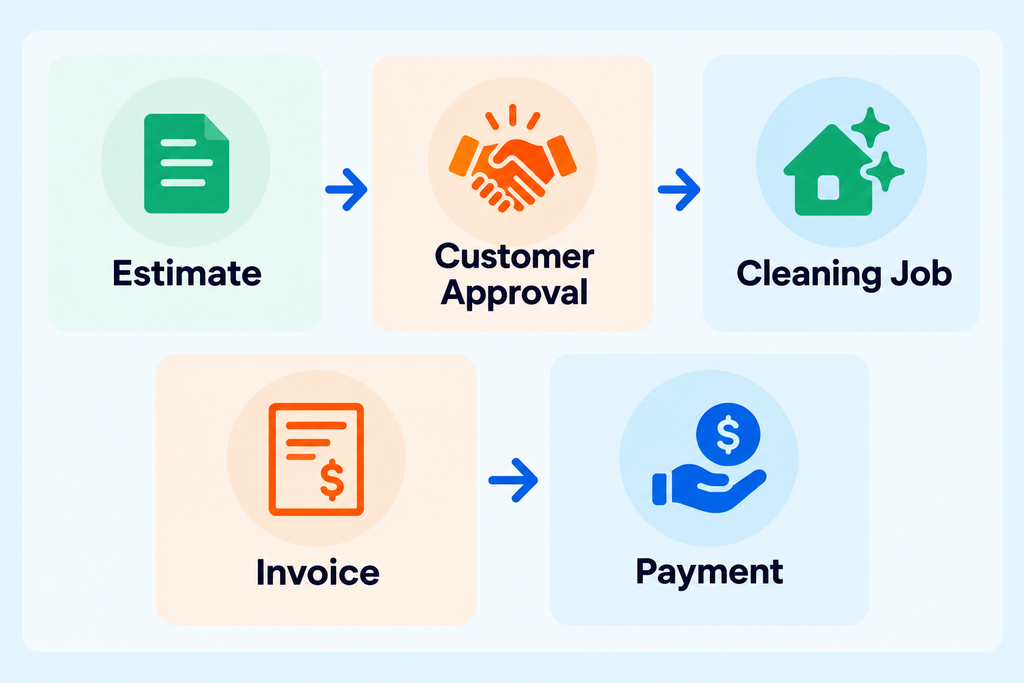
You can create the first part of that process with the free OpsButler cleaning business estimate template.
Choosing Payment Terms for Your Cleaning Business
Payment terms should fit the type of customer and cleaning work you perform.
Residential Cleaning
Many residential cleaning businesses use relatively short payment windows because each job is completed in a single visit.
Recurring Customers
Recurring customers may be billed after each visit or on a regular billing schedule.
Consistency matters more than constantly changing the process.
Commercial Cleaning
Commercial clients may have their own accounts-payable procedures and longer payment cycles.
Make sure the billing process and payment terms are understood before work begins.
Whatever terms you choose, display the actual due date prominently on the invoice.
Common Cleaning Invoice Mistakes
Sending a Vague Invoice
A single line that says “Cleaning — $500” may not tell the customer enough.
Show what the charge covers.
Forgetting the Service Address
This becomes particularly important when working with landlords, property managers, offices, or customers with multiple properties.
Using Duplicate Invoice Numbers
Every invoice should be uniquely identifiable.
Forgetting Add-Ons
If the customer approved extra work, make sure it appears on the invoice.
Sending the Invoice Late
Completed jobs that are not invoiced can easily become an administrative problem.
Build invoicing into your standard job-completion workflow.
Making Payment Difficult
Even a professional-looking invoice creates friction if the customer cannot easily determine how to pay.
Include clear payment instructions.
Invoice Template vs. Cleaning Business Software
A template can work perfectly well when you are starting out.
You can create an invoice in Word, Excel, Google Docs, or Google Sheets and manually keep copies of each document.
As your customer base grows, however, manual invoicing can become repetitive.
Cleaning business software may help combine tasks such as:
- Scheduling
- Customer management
- Estimates
- Invoices
- Payments
- Job history
- Team management
That does not mean every cleaning business needs software immediately.
A solo cleaner with a small number of customers may be perfectly comfortable with a template.
But once you are managing more jobs, employees, recurring customers, and outstanding invoices, automation can become much more valuable.
See our Best Cleaning Business Software: 7 Tools Compared to compare your options.
If scheduling is the bigger problem, see our Best Scheduling Software for Cleaning Businesses.
How to Make Invoicing Easier as Your Cleaning Business Grows
The goal is not simply to create a nicer invoice.
The goal is to build a repeatable process.
A simple workflow might look like this:
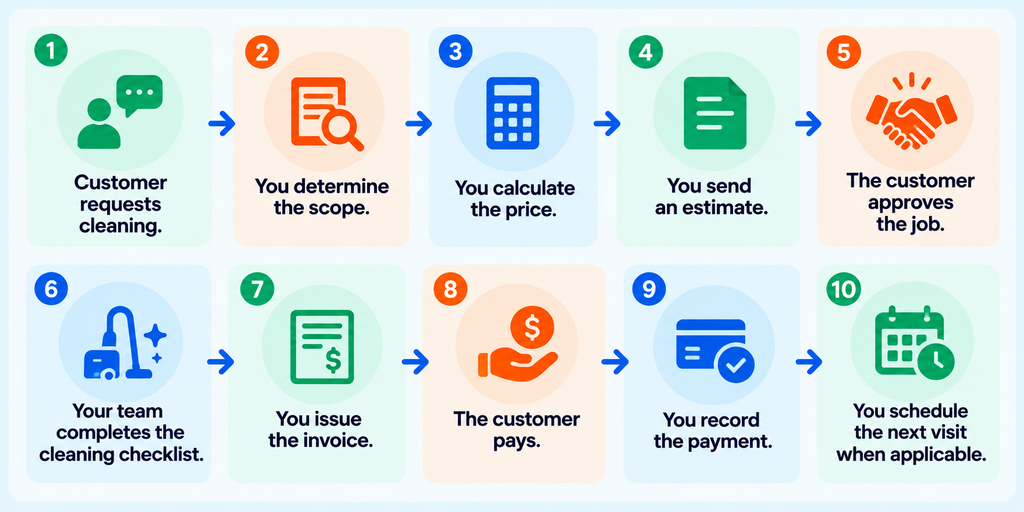
Once this workflow is consistent, it becomes much easier to identify which parts should eventually be automated.
If your bigger challenge is getting enough jobs into that workflow in the first place, read How to Get Clients for a Cleaning Business: 12 Proven Ways.
Final Take
A cleaning business invoice does not need to be complicated.
It needs to be clear.
Your customer should be able to look at the document and immediately understand:
- Who sent it
- Which property was cleaned
- When the work was completed
- What services were provided
- What each service cost
- The total amount due
- When payment is due
- How to pay
Start with the free cleaning business invoice template above and customize it to match your services and billing process.
As your business grows, you can move from manual templates to invoicing or cleaning business software when the time saved justifies the change.
The important part is creating a consistent system from estimate to completed job to invoice and payment.