
Jobber and Housecall Pro are two popular platforms for running a home service business.
Both can help a cleaning company manage customers, schedule jobs, send estimates and invoices, collect payments, and coordinate employees.
But they are not identical.
Jobber emphasizes a streamlined workflow from lead to payment, while Housecall Pro combines core field service management with strong dispatching, pricing, customer communication, and growth tools.
So which one makes more sense for a cleaning business?
This comparison breaks down Jobber vs Housecall Pro across pricing, scheduling, customer management, recurring jobs, invoicing, payments, automation, and team management.
Jobber vs Housecall Pro at a Glance
| Category | Jobber | Housecall Pro |
|---|---|---|
| Starting Price* | $29/month | $59/month |
| Entry Plan Users | 1 | 1 |
| Scheduling | Yes | Yes |
| Recurring Jobs | Yes | Yes |
| Online Booking | Yes | Yes |
| Estimates / Quotes | Yes | Yes |
| Invoicing | Yes | Yes |
| Online Payments | Yes | Yes |
| Customer Management | Yes | Yes |
| Mobile App | Yes | Yes |
| Team Management | Yes | Yes |
| Free Trial | 14 days | 14 days |
*Starting prices shown are based on annual billing at the time of publication. Plan pricing and included features can change.
At first glance, the platforms overlap heavily.
The bigger differences appear when you compare plan structure, team size, automation, dispatching, and the advanced tools your business may need as it grows.
What Is Jobber?
Jobber is field service management software designed to connect the major stages of a service business workflow.
A typical cleaning job can move through:
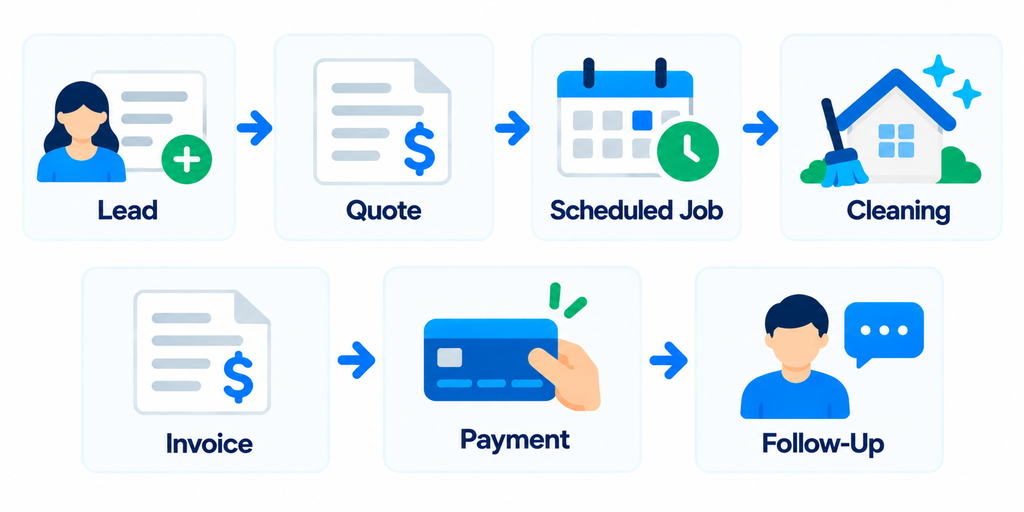
Jobber includes tools for customer management, scheduling, online booking, quotes, jobs, invoicing, payments, and reporting.
Higher plans add features such as automated reminders, quote and invoice follow-ups, job checklists, time and expense tracking, job costing, and more advanced workflow automation.
For a deeper breakdown, read our Jobber Review: Is It Worth It for Cleaning Businesses?.
What Is Housecall Pro?
Housecall Pro is also a field service management platform built for home service businesses, including home cleaning companies.
Its core tools include:
- Online booking
- Scheduling and dispatching
- Estimates
- Invoicing
- Payments
- Customer management
- Review management
- Price book
- Mobile access
Higher plans add capabilities such as routes, checklist automations, employee GPS tracking, QuickBooks Online synchronization, sales proposals, recurring service plans, and route optimization.
The result is a platform that can support both the office side of a cleaning business and employees working in the field.
1. Pricing
Pricing is one of the clearest differences between Jobber and Housecall Pro.
Jobber Pricing
Jobber currently has four main plans with annual-billing starting prices:
- Core — $29/month
- Connect — $99/month
- Grow — $149/month
- Plus — $399/month
Core includes one user.
User allowances and pricing change as you move into larger configurations and higher plans.
For a complete breakdown, see our Jobber Pricing Guide.
Housecall Pro Pricing
Housecall Pro currently has three main plans with annual-billing prices:
- Basic — $59/month for 1 user
- Essentials — $149/month for up to 5 users
- MAX — $299/month for up to 8 users
Monthly billing costs more.
Additional users and optional products can also increase the total cost.
What This Means for Cleaning Businesses
Jobber has the lower advertised entry price.
That can matter for a solo cleaner who needs basic scheduling, quotes, invoicing, and customer management.
Housecall Pro’s plan structure becomes more interesting when you start comparing team configurations because Essentials includes up to five users and MAX includes up to eight.
Do not compare only the cheapest advertised price.
Compare the price of the configuration your actual team needs.
2. Scheduling and Dispatching
Scheduling is central to both platforms.
Jobber
Jobber provides a calendar for scheduling one-time and recurring work, assigning team members, and tracking appointments.
Its scheduling tools can also connect with online booking and automated customer reminders.
For a cleaning business, that could look like:
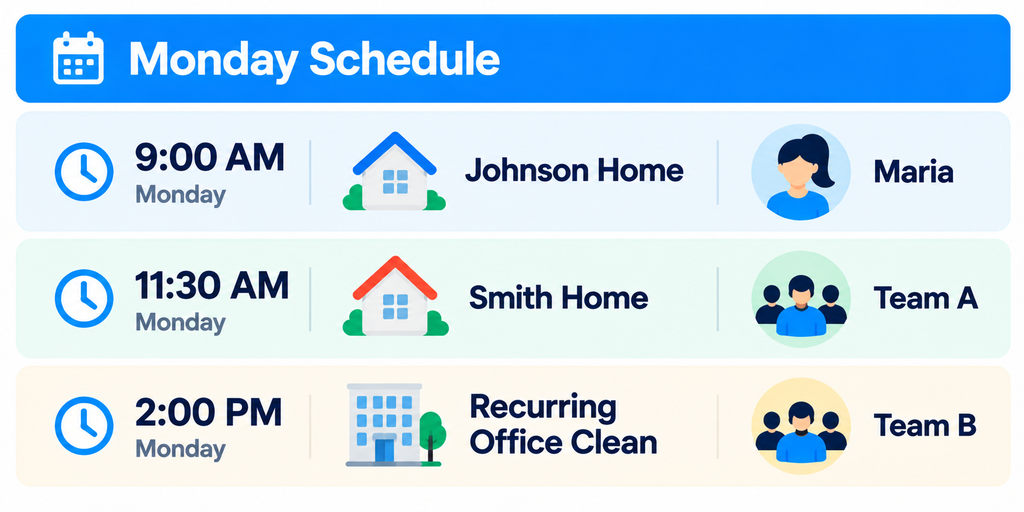
The goal is to keep customer details, job information, and the schedule connected.
Housecall Pro
Housecall Pro also supports one-time and recurring jobs, calendar scheduling, and dispatching.
Its scheduling workflow is strongly oriented toward assigning field employees and managing their work from the office.
Higher plans add tools such as routes and employee GPS tracking, while MAX adds route optimization.
Which Approach Fits Your Business?
For straightforward recurring residential cleaning, either platform can cover the core scheduling workflow.
If your operation depends heavily on dispatching multiple crews throughout the day, Housecall Pro’s field-service-oriented routing and GPS tools may deserve closer examination.
If your priority is keeping the overall customer workflow simple from request through payment, Jobber may feel more straightforward.
3. Customer Management
Both platforms maintain customer information around the work performed for that customer.
Jobber
Jobber’s client management tools can connect:
- Contact information
- Property information
- Requests
- Quotes
- Jobs
- Invoices
- Payments
- Communication history
This makes it easier to open a customer record and understand what has happened without searching through several systems.
Housecall Pro
Housecall Pro also centralizes customer information and provides access to jobs, estimates, leads, invoices, communication, and customer profiles.
Its customer portal can allow customers to manage appointments, pay invoices, and communicate with the business.
Why This Matters
A cleaning CRM should answer questions quickly.
When a customer calls, you should be able to determine:
Who is this customer?
What service do they receive?
When is their next cleaning?
What did we charge last time?
Do they owe us money?
What happened on the previous visit?
If either platform can answer those questions quickly for your team, it is doing the core CRM job well.
For a broader CRM comparison, see our Best CRM for Cleaning Businesses: 7 Tools Compared.
4. Recurring Cleaning Jobs
Recurring work is especially important for cleaning businesses.
A customer may need service:
- Weekly
- Every two weeks
- Every four weeks
- Monthly
- On another repeating schedule
Both Jobber and Housecall Pro support recurring jobs.
The important question is not simply whether the feature exists.
Test how easily your staff can:
- Create the recurring customer.
- Set the service frequency.
- Assign the correct cleaner or crew.
- Change one visit without breaking the entire series.
- Update future visits when needed.
- Invoice according to your preferred schedule.
- Find the customer’s history later.
A feature checklist cannot tell you whether one workflow feels easier to your team.
This is one of the most important things to test during each platform’s free trial.
5. Quotes and Estimates
Both platforms allow service businesses to create and send estimates or quotes.
Jobber connects quotes to the broader client and job workflow.
Housecall Pro also supports estimates and can turn approved work into scheduled jobs.
For basic residential cleaning, the workflow may be simple:
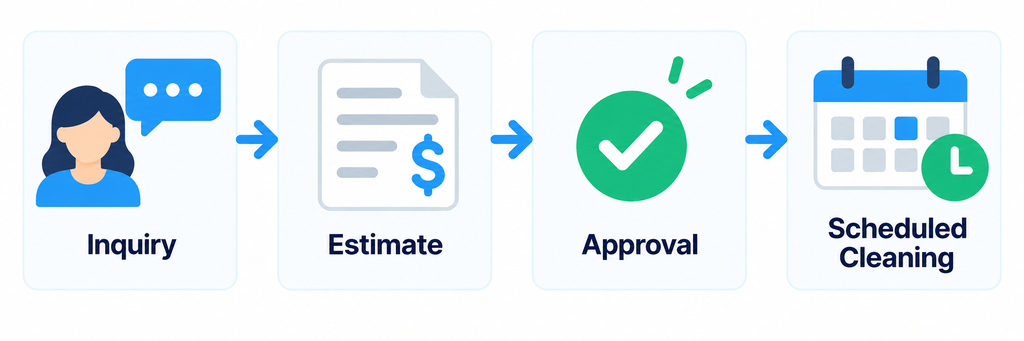
The differences become more important when you sell higher-value or more complicated services.
Examples include:
- Deep cleaning
- Move-in or move-out cleaning
- Post-construction cleaning
- Large commercial cleaning jobs
- Multi-service packages
Housecall Pro’s higher-level sales proposal tools may be useful for businesses that rely heavily on more elaborate proposals.
Jobber’s Grow and Plus plans also add more advanced quoting and sales functionality.
6. Invoicing and Payments
Both platforms can handle invoicing and online payments.
Jobber
Jobber can create invoices from completed work and supports different invoicing schedules for one-time and recurring jobs.
Select plans also support automated invoice follow-ups and automatic payments.
Automatic payments can be particularly useful for recurring cleaning customers because a stored payment method can be charged according to the billing schedule.
Housecall Pro
Housecall Pro supports digital invoicing, payment collection, invoice reminders, and payment tracking.
Its built-in payment system can record a payment against the customer’s invoice and job.
Housecall Pro also supports automated invoicing workflows for unpaid invoices.
Cleaning Business Example
Consider a biweekly customer.
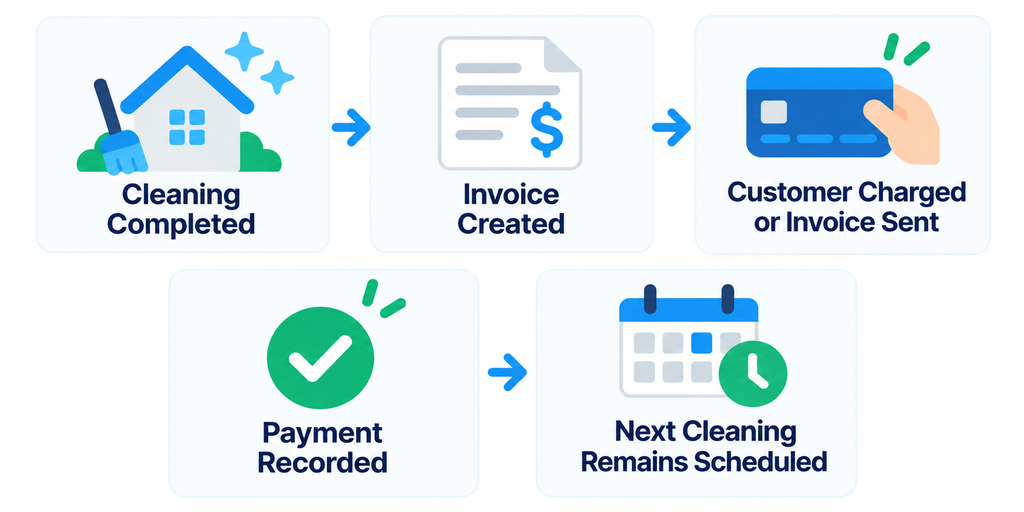
The less manual work required to repeat this process across dozens or hundreds of recurring customers, the more valuable the software becomes.
7. Team Management
A solo cleaner and a 20-person cleaning company have very different software requirements.
Both platforms can support teams, but you should test the permissions and workflows your employees actually need.
Questions to ask include:
- Can cleaners see only the jobs they need?
- Can they access job instructions from a phone?
- Can they mark work complete?
- Can they record time?
- Can managers see where work stands?
- Can office staff change schedules quickly?
- Can employees access sensitive customer or financial information they do not need?
Housecall Pro emphasizes dispatching and field-team functionality, including GPS-related tools on higher plans.
Jobber also supports team scheduling, job information, checklists, time tracking, and mobile workflows, with availability depending on the plan.
For a growing cleaning company, employee usability can matter more than a long feature list.
Jobber vs Housecall Pro: Which Is Better for Different Cleaning Businesses?
The right choice changes depending on how your business operates.
Solo Cleaning Business
Jobber deserves consideration because its entry-level Core plan starts at a lower advertised price.
If one person handles:
- Leads
- Scheduling
- Cleaning
- Quotes
- Invoices
- Payments
you may not need the more advanced team-management features available in higher plans.
Housecall Pro Basic can still be a fit if you prefer its workflow or want specific features included in its entry plan.
Small Cleaning Team
This is where the comparison becomes closer.
A small team should compare the actual features and user limits of:
Jobber Connect or Grow
against:
Housecall Pro Essentials
Do not choose based only on plan names.
List the five or six workflows your team performs every day and test them in both systems.
Multi-Crew Cleaning Company
Housecall Pro becomes particularly worth examining when dispatching, routes, GPS visibility, and field-team coordination are major priorities.
Jobber remains relevant for larger teams, especially when you want customer management, job workflows, automation, profitability tools, and team operations connected in one system.
At this size, request the actual price for your required user count before making a decision.
Jobber vs Housecall Pro: Feature Comparison
| Feature | Jobber | Housecall Pro |
|---|---|---|
| Customer Management | Yes | Yes |
| One-Time Scheduling | Yes | Yes |
| Recurring Jobs | Yes | Yes |
| Online Booking | Yes | Yes |
| Quotes / Estimates | Yes | Yes |
| Invoicing | Yes | Yes |
| Online Payments | Yes | Yes |
| Automated Reminders | Available | Available |
| Employee Time Tracking | Available | Available |
| Job Costing | Available on higher plans | Available |
| QuickBooks Online Integration | Available | Available on qualifying plans |
| Routing Tools | Available | Available |
| GPS / Field-Team Tools | Available features vary | Available on higher plans |
| Free Trial | 14 days | 14 days |
“Available” does not mean the feature is included in every subscription.
Always verify the feature against the exact plan you are considering.
Where Jobber Stands Out
Jobber’s main strength for a cleaning business is the way it connects the customer lifecycle.
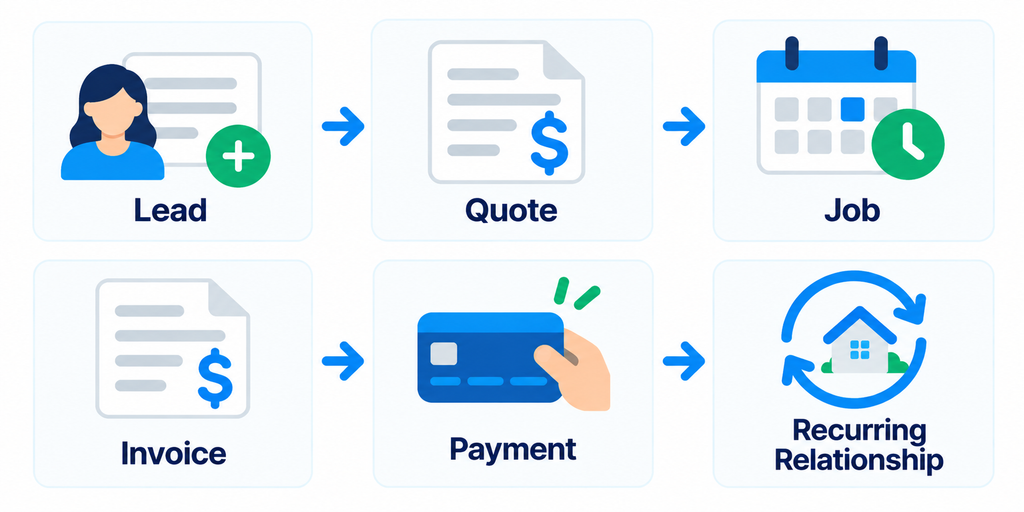
That structure can work well for cleaning companies that want one operational system without building a complicated software stack.
Jobber also offers a relatively low-priced entry plan for a solo user.
Its higher plans add automation, profitability tools, job costing, and more sophisticated workflows as the business grows.
Where Housecall Pro Stands Out
Housecall Pro combines the same core field-service functions with a strong emphasis on dispatching and field operations.
Depending on the plan, its tools can include:
- Routes
- Employee GPS tracking
- Checklist automations
- Flat-rate pricing
- Photo reports
- Commissions
- Sales proposals
- Recurring service plans
- Route optimization
Those capabilities may be especially relevant to cleaning companies operating several crews across a larger service area.
Its Essentials and MAX plans also include multiple users in their published pricing, which is important when comparing total software cost for a team.
The Best Way to Choose Between Jobber and Housecall Pro
Do not choose either platform after watching a product demo.
Run the same cleaning job through both systems.
Use this test:
- Add a new lead.
- Create a quote or estimate.
- Convert it into a customer.
- Schedule a cleaning.
- Make the job recurring.
- Assign a cleaner.
- Add job instructions.
- Reschedule one visit.
- Complete the job from a phone.
- Create an invoice.
- Record or collect payment.
- Find the complete customer history.
- Check how the workflow appears to an employee.
Then ask:
Which system required fewer steps?
Which system would be easier to teach to a new cleaner or office employee?
Which system solves problems you actually have today?
That test is more useful than comparing dozens of features you may never use.
Do You Need Either Platform?
Not every cleaning business needs a full field service management platform immediately.
If you are just starting and have only a handful of customers, a simpler collection of tools may be enough.
But complexity grows quickly when you add:
- Recurring customers
- Multiple cleaners
- Schedule changes
- Quotes
- Unpaid invoices
- Customer messages
- Payroll or time tracking
- Multiple crews
Software becomes valuable when the cost of managing that complexity manually becomes greater than the cost of the system.
If you want to compare these platforms with more options, see our Best Cleaning Business Software: 7 Tools Compared.
Final Take
Jobber and Housecall Pro can both handle the core operational needs of a cleaning business.
Jobber starts at a lower advertised annual-billing price and provides a structured workflow connecting customers, quotes, jobs, invoices, payments, and recurring work.
Housecall Pro starts at a higher price but combines core field service management with strong dispatching, routing, field-team, pricing, and growth tools across its plans.
The better fit depends on how your cleaning business actually operates.
A solo cleaner should pay close attention to the cost and simplicity of the entry plans.
A small team should compare automation, user limits, recurring-job workflows, and employee usability.
A larger multi-crew company should test dispatching, routing, permissions, field visibility, and the total price for every user it needs.
Both platforms offer a 14-day free trial, so the most useful comparison is to run the same real cleaning workflow through each platform before paying for either one.
If Jobber is still your leading option, read our Jobber Review and Jobber Pricing Guide.
If neither platform feels right, compare the Best Jobber Alternatives for Cleaning Businesses.